

Choosing the right IT provider is defined by one decision: finding a managed service provider (MSP) that matches your business size, risk level, and budget before a tech failure forces your hand. Small business owners who approach IT service selection for small business with a structured process get faster response times, fewer outages, and predictable monthly costs. Those who pick based on price alone often pay twice. This guide covers engagement models, SLA evaluation, cybersecurity alignment, and a proven selection process so you can make a confident, informed choice.
How to choose an IT provider for small business: engagement models first
The first decision when you choose an IT provider for small business is selecting the right engagement model. The model determines how you pay, how fast you get help, and how much risk you carry. Three primary models dominate the small business market:
- Break-fix: You call when something breaks, and you pay per incident. No monthly fee, no ongoing relationship. This model works for businesses with minimal technology dependence and very low IT budgets.
- Per-user managed IT: A flat monthly fee per employee covers monitoring, help desk access, and basic security. Costs are predictable and scale with headcount. This is the most common model for growing small businesses.
- Fully managed IT: The provider takes full responsibility for your infrastructure, security, backups, and compliance. Higher monthly cost, but the provider is accountable for outcomes, not just tasks.
Your budget, team size, and growth plans all drive which model fits. A five-person law firm with client data on shared drives needs fully managed IT. A two-person retail shop with cloud-based point-of-sale software may do fine with per-user coverage. Review your IT budget planning before committing to any model, because the monthly fee is only part of the total cost.
Pro Tip: If your business cannot afford 30 minutes of downtime, avoid break-fix entirely. Break-fix providers have no contractual obligation to respond quickly, and response times of several hours are common.

The right model also affects how your provider behaves day to day. Per-user and fully managed providers have a financial incentive to prevent problems because reactive work cuts into their margin. Break-fix providers earn more when things go wrong. That structural difference matters more than any sales pitch.
What should a small business look for in an IT SLA?
A Service Level Agreement (SLA) is the contract clause that defines exactly what your IT provider must deliver and when. Vague SLAs are the single most common source of conflict between small businesses and their IT providers. A well-written SLA specifies response time, resolution time, coverage hours, and ticket priority tiers.
Effective SLAs define response and resolution times by priority level. Here is what verified industry benchmarks look like:
- Critical issues (server down, full outage): response within 15–30 minutes, resolution target within 4 hours.
- High priority (key employee cannot work): response within 1–2 hours, resolution target within 8 hours.
- Medium priority (partial service degradation): response within 4–8 hours, resolution target within 1 business day.
- Low priority (minor requests, non-urgent changes): response within 1–2 business days, resolution target within 5 business days.
These tiers only protect you if the SLA is enforceable. Strong SLAs include defined remedies for missed targets, such as service credits or escalation procedures. If a provider cannot tell you what happens when they miss a response window, that is a red flag. Walk away.
A vague SLA is not a safety net. It is a document that protects the provider, not you. Insist on measurable targets and written consequences for missed commitments before you sign anything.
Coverage hours matter as much as response times. A provider who promises 24/7 support but routes after-hours calls to a third-party answering service is not delivering 24/7 support. Confirm that the SLA specifies who responds, not just when.
Pro Tip: Verify how response time is measured before signing. Insist that the SLA clock starts when you log the ticket, not when a technician is assigned. Internal workflows can add up to 90 minutes of hidden delay, turning a "30-minute response" into a two-hour wait.
How does cybersecurity fit into your IT provider selection?
Cybersecurity is not a separate purchase. It is a core component of any IT provider relationship, and the level of support you need depends on your business risk and available resources. NIST's 2026 cybersecurity guidance for small businesses outlines a spectrum of options from a single in-house role to fully outsourced security operations.
The reality is stark: approximately 81.9% of U.S. small businesses have no paid employees besides the owner. That statistic means most small businesses have zero internal IT staff, let alone a dedicated security person. Outsourcing cybersecurity is not a luxury for these firms. It is the only practical option.
Here is how to match your cybersecurity support to your situation:
- Solo or micro-business (1–5 employees): Outsource fully. Look for an MSP that includes endpoint protection, multi-factor authentication (MFA) setup, and email security as standard services, not add-ons.
- Small team (6–25 employees): A managed security layer from your IT provider covers most risks. Add a quarterly security review and documented incident response plan.
- Growth-stage business (25+ employees): Consider a provider with a dedicated security operations center (SOC) or access to one. Internal IT staff can handle day-to-day tasks while the SOC monitors threats.
Cybersecurity outsourcing decisions should be based on business risk and budget, not just cost. A dental practice storing patient records under HIPAA has a different risk profile than a landscaping company. Your provider should understand that difference and price accordingly.
| Business type | Recommended cybersecurity model | Key services needed |
|---|---|---|
| Solo/micro-business | Fully outsourced MSP | MFA, endpoint protection, email security |
| Small team (6–25) | Managed security layer | Threat monitoring, incident response plan |
| Growth-stage (25+) | MSP with SOC access | SOC monitoring, compliance reporting |
Explore cybersecurity options for small business that match your specific risk profile before finalizing any provider agreement.
How to evaluate and select your IT service provider
A structured evaluation process protects you from making a decision based on a polished sales presentation. A thorough MSP evaluation typically takes 6–8 weeks and includes reference checks, contract review, and exit term negotiation. Rushing this process is one of the most expensive mistakes a small business can make.
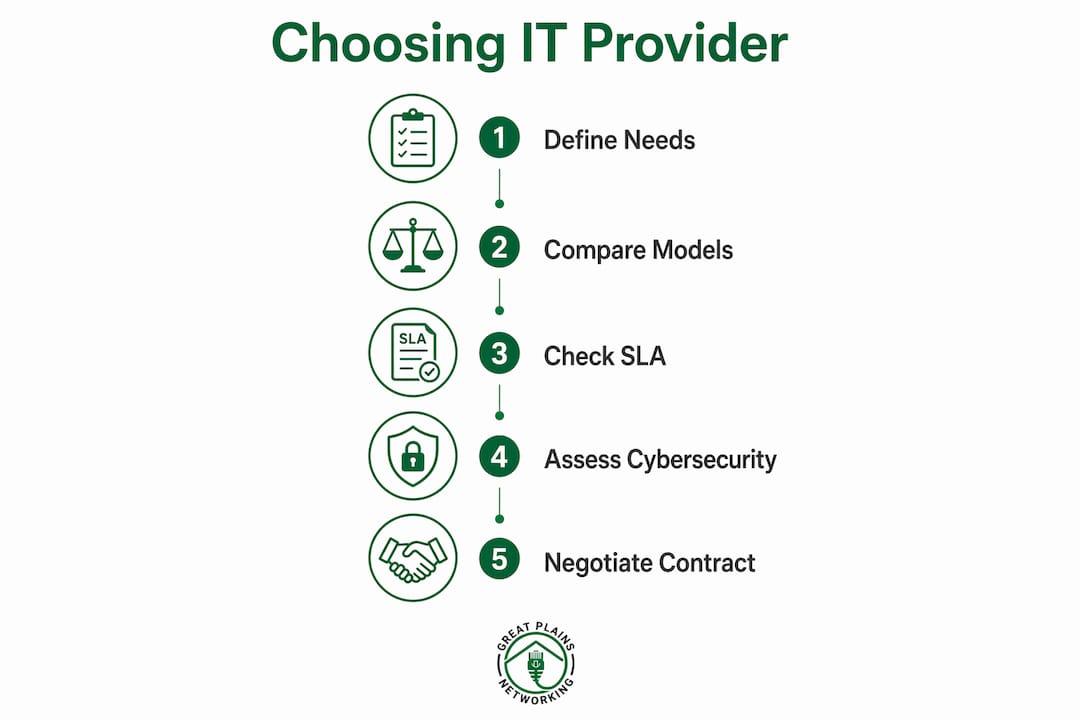
Follow these steps in order:
- Define your requirements. List your current pain points, required response times, compliance obligations, and growth plans. This becomes your evaluation baseline.
- Build a shortlist. Identify three to five providers through referrals, industry associations, or a formal Request for Proposal (RFP). Avoid evaluating more than five at once. Decision quality drops with too many options.
- Request client references. Ask specifically for references from businesses in your industry and of similar size. A provider who excels with 200-person companies may be poorly suited for a 10-person firm.
- Build a comparison matrix. Score each provider across pricing, SLA terms, security controls, reporting quality, and exit terms. Use a structured comparison matrix to align your team and make like-for-like comparisons. Price alone is not a valid evaluation criterion.
- Negotiate contract terms. Focus on exit clauses, SLA flexibility, and what happens to your data if you leave. A provider who resists reasonable exit terms is telling you something important about how they operate.
- Pilot before committing. If possible, run a 30-day pilot on a limited scope before signing a long-term agreement. Greatplainsnetworking offers no long-term contracts, which removes this barrier entirely.
Pro Tip: Negotiating contract exit terms before you sign is far easier than negotiating them after a relationship goes wrong. Always confirm data portability, notice periods, and transition support in writing.
Many MSP selection mistakes come from choosing based on price or sales responsiveness rather than operational competence. The best providers prevent problems. They document their processes, report on outcomes, and communicate clearly. Ask every candidate: "What does your monthly reporting include?" If the answer is vague, that provider will be vague when something goes wrong too. Review the IT services checklist for 2026 to build a complete evaluation framework before your first provider meeting.
Key Takeaways
Choosing the right IT provider requires matching your engagement model, SLA terms, and cybersecurity coverage to your actual business risk and budget before signing any contract.
| Point | Details |
|---|---|
| Match the engagement model | Choose break-fix, per-user, or fully managed IT based on your team size and downtime tolerance. |
| Demand enforceable SLAs | Insist on written response and resolution times by priority tier, with defined remedies for missed targets. |
| Align cybersecurity to your risk | Outsource security fully if you have no internal IT staff; match the model to your compliance obligations. |
| Use a comparison matrix | Score providers on SLA, security, reporting, pricing, and exit terms, not price alone. |
| Negotiate exit terms first | Confirm data portability and transition support in writing before you sign any agreement. |
What I have learned from watching small businesses pick the wrong IT partner
I have seen the same mistake repeated more times than I can count. A business owner gets three quotes, picks the lowest one, and signs a two-year contract. Six months later, tickets go unanswered for days, the monthly report is a single-page PDF with no useful data, and the exit clause requires 90 days' notice with a penalty fee.
The uncomfortable truth is that the IT provider market rewards good salespeople, not necessarily good operators. A provider who calls you back within an hour during the sales process may take four hours to respond to a critical ticket once you are under contract. The only way to separate the two is to ask for documented proof of performance: real SLA reports from current clients, not testimonials.
I also think small businesses underestimate how much communication style matters. A provider who speaks in technical jargon during the sales call will speak in technical jargon when your server goes down at 8 a.m. on a Monday. You need a partner who can explain what happened, why it happened, and what they are doing to prevent it again, in plain language, without making you feel like you asked a stupid question.
The lowest price is almost never the best value. The best value is a provider who prevents problems, documents everything, and communicates clearly. Those three things are worth paying for.
— Nicholas
How Greatplainsnetworking supports small businesses in Norman, Moore, and OKC
Small businesses in Norman, Moore, and Oklahoma City deserve IT support that works before problems start, not after.
Greatplainsnetworking delivers managed IT support for small business with 24/7 proactive monitoring, same-day response times, and no long-term contracts. Whether you run a dental practice, a law firm, or a growing retail operation, Greatplainsnetworking builds a customized IT plan that covers cybersecurity, data backup, and ongoing tech support in plain language you can actually use. There is no jargon, no lock-in, and no guessing about what you are getting. Contact Greatplainsnetworking today to schedule a no-obligation assessment and find out exactly what your business needs to stay protected and operational.
FAQ
What is the difference between break-fix and managed IT?
Break-fix IT support charges per incident with no ongoing commitment, while managed IT provides continuous monitoring and support for a flat monthly fee. Managed IT is better suited for businesses that cannot afford extended downtime.
How long does it take to evaluate and choose an IT provider?
A thorough MSP evaluation process typically takes 6–8 weeks, including reference checks, SLA review, and contract negotiation. Rushing this timeline increases the risk of signing with the wrong provider.
What should a small business SLA include?
An SLA should specify response and resolution times by priority tier, coverage hours, escalation procedures, and written remedies for missed targets. Vague SLAs without measurable commitments are a red flag.
Do small businesses really need outsourced cybersecurity?
Yes, for most small businesses. With 81.9% of U.S. small businesses having no paid employees beyond the owner, outsourcing cybersecurity is the only practical way to maintain consistent protection.
How do I avoid getting locked into a bad IT contract?
Negotiate exit terms, data portability, and transition support before signing. Providers who offer flexible or month-to-month agreements, like Greatplainsnetworking, give you the most protection if the relationship does not work out.