
An MFA fatigue attack, also called push bombing or MFA bombing, happens when an attacker who already has a stolen password floods a victim with repeated push notifications until the person taps "approve" just to make them stop. The single most effective immediate fix is enabling number matching, which forces the user to type a code shown on the login screen into their authenticator app instead of tapping a single button. This one change turns a blind, one-tap approval into a deliberate action. Sections below cover detection rules, tactical configurations, and a phased path to phishing-resistant MFA.
TL;DR:
- Enabling number matching requires users to enter a code from their login screen into their app, making approval a deliberate action instead of a single tap.
- Monitoring for high push notification volume, especially outside normal hours or from unfamiliar IPs, can help detect MFA fatigue attacks early.
- Throttling push challenge creation at the system level and implementing risk-based conditional access significantly reduce attack success chances.
- Strengthening helpdesk verification through callbacks and manager approvals is critical to prevent attackers exploiting reset processes after an MFA attack.
- Switching to FIDO2 security keys or passkeys offers a higher level of phishing resistance by eliminating push notifications altogether.
Table of Contents
- How MFA Fatigue Attacks Work
- Why Push Fatigue Attacks Actually Succeed
- What Are the Warning Signs of an MFA Bombing Attempt?
- Tactical Defenses You Can Turn On This Week
- Should You Move to FIDO2 or Passkeys Instead?
- What to Do If You Suspect an Active MFA Bombing Attempt
- A Practitioner's View on MFA Fatigue for Small Businesses
- Get MFA Fatigue Protection Without Building a Security Team
- Sources
- FAQ
How MFA Fatigue Attacks Work
An MFA fatigue attack cannot start without a stolen password. Attackers typically get one through phishing kits, credential stuffing against reused passwords, or bulk credential dumps purchased on dark web markets. Once they have valid credentials, the attack unfolds in a predictable sequence:
- Initial sign-in attempt. The attacker logs in with the stolen username and password, triggering a legitimate MFA push to the real user's phone.
- The first push challenge. The victim sees an unexpected approval request, often at an odd hour, and usually denies or ignores it.
- Repeated prompts, or "bombing." The attacker retries the login repeatedly in quick succession over a period, betting that irritation or confusion eventually wins.
- Social engineering follow-up. Some attackers call or text the victim posing as IT support, claiming the prompts are a "known glitch" and asking them to just approve one.
- Post-compromise pivot. Once approved, the attacker has a live session and moves toward mailbox access, VPN entry, or lateral movement across the network.
The vulnerability lives in the user experience itself. A one-tap "approve" button, disconnected from any session context, gives attackers unlimited free attempts at zero technical cost. That design flaw, not user carelessness, is the real root cause.
Why Push Fatigue Attacks Actually Succeed
Blaming employees for tapping "approve" misses the point. The failure is architectural as much as human. Several factors combine to make these attacks reliably effective:
- Frequent, routine MFA prompts train users to approve quickly without reading details, a habituation effect that security teams underestimate.
- Standard approve/deny prompts carry no session-bound context, so a user cannot tell a legitimate login attempt from an attacker's.
- Most identity providers allow unlimited retries with no cooldown, letting attackers send prompts indefinitely at no cost.
- Helpdesk and account recovery processes are often the softest target, since a convincing phone call can bypass technical controls entirely.
Security teams spent years optimizing MFA for speed and low friction. That usability push, ironically, built the exact vulnerability attackers now exploit.
Pro Tip: Audit your helpdesk's identity verification script before you audit your MFA settings. A single weak "reset my password" phone process undoes every technical control you put in place upstream.
What Are the Warning Signs of an MFA Bombing Attempt?
Detection comes down to volume and pattern recognition, not guesswork. The clearest signal is a spike in push notifications sent to a single account in a short window, especially outside normal working hours or from an unfamiliar IP address or device.
Watch specifically for these patterns in your identity provider logs:
- A chain of several denied or ignored pushes followed suddenly by one approval, which almost always indicates fatigue rather than a genuine login.
- New MFA method enrollments immediately after a suspicious approval, since attackers often register their own device to maintain persistent access.
- Authentication attempts originating from a geographic location or ASN the user has never logged in from before.
- A helpdesk ticket requesting an MFA reset that arrives around the same time as unusual push activity on that account.
A practical SIEM rule that most identity providers can support: alert when more than five push attempts hit a single account within 10 minutes. Combining that volume trigger with IP anomaly detection and helpdesk ticket correlation, as MITRE's ATT&CK documentation on MFA-related credential access techniques recommends, cuts false positives sharply compared to alerting on volume alone.
Once that alert fires, triage moves fast: contact the user directly through a channel other than the compromised account, lock or suspend the account if there's any doubt, preserve the authentication logs before anything rotates out of retention, and escalate to incident response.
Tactical Defenses You Can Turn On This Week
You don't need a budget increase to blunt most MFA fatigue attacks. The following controls are configuration changes, not new purchases, and most identity providers already support them.
Enable number matching immediately. CISA's fact sheet on number matching calls it the recommended interim mitigation for exactly this attack pattern. Instead of a single approve button, the user sees a two or three digit number on their login screen and must type that same number into their authenticator app. Microsoft's documentation for enabling number match in Microsoft Authenticator walks through the tenant-level policy settings. One caveat worth checking: audit every integrated application first, since some legacy systems using older RADIUS or NPS flows can silently fall back to plain approve/deny prompts unless upgraded, quietly reopening the exact hole you just closed.
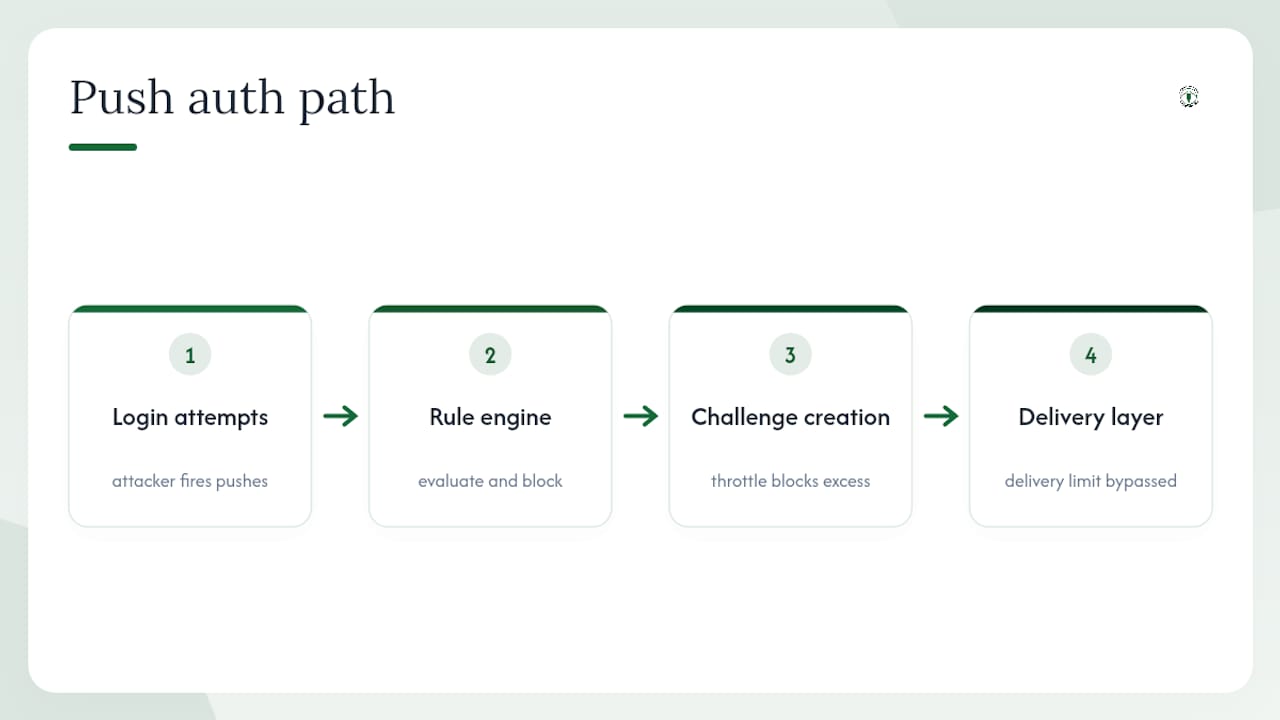
Throttle push volume, not just delivery. Rate limiting matters, but where you apply it matters more. Enforcing limits only at the notification delivery layer still lets an attacker generate unlimited challenges behind the scenes. The throttle needs to sit at the challenge creation and rule engine level so repeated authentication attempts get blocked before a new push ever fires.
Layer in risk-based conditional access. NIST SP 800-207 lays out the zero trust principle underlying this: authentication decisions should weigh context, not just credentials. Configure conditional access to evaluate device compliance, IP reputation, and impossible-travel patterns before triggering a prompt at all. Our four-phase conditional access playbook breaks this rollout down for smaller IT teams without a dedicated identity architect.
Harden the helpdesk and recovery path. This is the control most SMBs skip, and it's often the one attackers exploit after number matching shuts the front door. Require a callback to a verified number before any MFA reset, add manager approval for privileged account resets, and log every reset request with a timestamp and requester identity.
Pro Tip: Test your own helpdesk with a mock social engineering call once a quarter. If a stranger can talk their way into an MFA reset over the phone, none of your technical controls matter.
Should You Move to FIDO2 or Passkeys Instead?
Number matching raises the cost of an attack. Phishing-resistant MFA, specifically FIDO2 security keys and passkeys, removes the push notification vector entirely, since there's no prompt for an attacker to bomb in the first place. Security researchers at Authsignal frame number matching as a necessary baseline, not a finish line, and argue passkeys are the category-ending fix for push-based social engineering.
Migration doesn't need to happen all at once. A phased approach works better for budget-constrained teams:
- Start with privileged accounts. Admins, finance staff with wire authority, and helpdesk technicians carry the highest blast radius if compromised, so migrate them first.
- Pilot before a full rollout. Test hardware keys or platform passkeys with a small group to work out enrollment friction before pushing company-wide.
- Handle legacy applications with a gateway. For systems that can't support FIDO2 natively, place them behind a FIDO2-authenticated gateway or require VPN with step-up authentication as a compensating control.
- Weigh passkeys against hardware keys. Passkeys are cheaper and easier to deploy across a workforce; physical keys like YubiKeys add a layer that survives even a fully compromised device.
Our guide to MFA options for legal offices walks through this tradeoff for regulated small practices specifically.
What to Do If You Suspect an Active MFA Bombing Attempt
Speed matters more than perfection here. If push volume spikes on an account, move through containment before investigation:
- Contain first. Revoke active sessions for the account, disable it temporarily, and block the source IP addresses at the firewall or identity provider level.
- Capture evidence immediately. Screenshot the push log, record exact timestamps of each attempt, and note the total count before logs age out of retention.
- Run the helpdesk script correctly. Verify the user's identity through a callback, never through the channel that may be compromised, and document the call.
- Remediate after containment. Rotate the account's credentials, audit MFA method enrollments for anything the attacker registered, enforce number matching if it wasn't already on, and review why the recovery flow allowed the exposure.
Pro Tip: Keep a printed or offline copy of your incident response checklist. If the attack targets your identity provider itself, you don't want your only response plan locked behind the same login you're trying to contain.
A Practitioner's View on MFA Fatigue for Small Businesses
Small businesses tend to assume MFA fatigue attacks target enterprises with large security teams. That's backwards. A five-person law firm or dental practice is often a softer target precisely because nobody's watching push volume at 2 a.m. You don't need a security operations center to close this gap. Enabling number matching in Microsoft 365 admin settings takes an afternoon, and pairing it with managed 24/7 monitoring means someone actually sees the alert when push attempts spike, rather than discovering it after a breach. Regulated practices should also check our SB 626 readiness audit and HIPAA and cyber insurance audit for gaps that compound MFA risk.
— Nicholas
Get MFA Fatigue Protection Without Building a Security Team
Some managed IT providers offer small businesses around the clock monitoring of authentication logs to detect push-bombing attempts and contain them before they become breaches. Instead of hoping teams notice a spike in login prompts, 24/7 monitoring can flag unusual push volume, anomalous logins, and helpdesk reset patterns in real time, then guide staff through number matching, conditional access, and recovery-flow hardening in plain language.

If your current setup still relies on one-tap approvals with no throttling, that's a fixable gap, not a reason to panic. Start with our cybersecurity services for small business page to see what a proper MFA hardening review includes, or reach out through Great Plains Networking's managed IT support for a same-day response and a straightforward look at where your identity controls stand today.
Sources
- CISA: Implement number matching in MFA applications (fact sheet)
- Microsoft Learn: how-to MFA number match
- NIST SP 800-207: Zero Trust Architecture
- MITRE ATT&CK: T1621
FAQ
How Do You Prevent an MFA Fatigue Attack?
Enable number matching so users must type a code instead of tapping approve, add push throttling at the challenge creation level, and layer in risk-based conditional access to cut unnecessary prompts in the first place. Hardening your helpdesk reset process closes the social engineering path attackers use when technical controls hold firm.
What Are the Four Types of MFA?
The four common categories are something you know (a password or PIN), something you have (a phone, hardware key, or authenticator app), something you are (biometrics like a fingerprint or face scan), and somewhere you are (location or network-based context). Phishing-resistant methods like FIDO2 security keys combine "something you have" with cryptographic proof that can't be phished.
What Percentage of Attacks Does MFA Stop?
Microsoft's Digital Defense Report has found that properly implemented MFA blocks the large majority of password-based account compromise attempts. That effectiveness depends on the implementation, which is exactly why weak push-based MFA without number matching still leaves a door open for fatigue attacks.
What Is MFA Bombing?
MFA bombing, also called push bombing or MFA fatigue, is when an attacker with a stolen password sends repeated authentication push notifications to a victim's phone, hoping irritation or confusion leads to an accidental approval. It's the same attack as an MFA fatigue attack, just a different name for the same technique.