

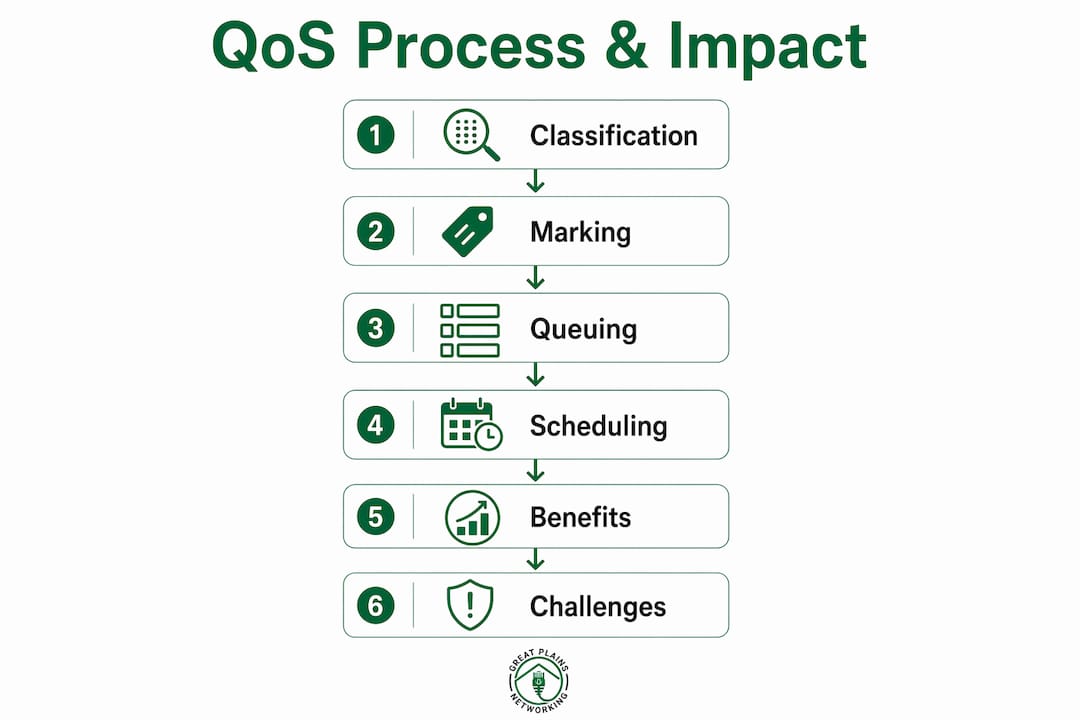
Quality of Service (QoS) in networking is defined as a set of traffic management techniques that prioritize and regulate data flows so critical applications receive the bandwidth and low latency they require. Without QoS, a network treats every packet equally. That means a large file download can compete directly with a live VoIP call, and the call loses. For IT professionals managing business networks, understanding what is quality of service in networking is the first step toward building infrastructure that performs reliably under real-world load. QoS solves congestion problems through four core mechanisms: classification, marking, queuing, and scheduling.
What is quality of service in networking and how does it work?
QoS works by identifying traffic types, labeling them with priority values, placing them in appropriate queues, and then transmitting them in a controlled order. Each step builds on the last. Skip one, and the entire policy breaks down.
Classification is the process of identifying what type of traffic a packet carries. A router or switch inspects packet headers to determine whether the data belongs to a VoIP call, a video conference, a cloud application, or routine web browsing. Classification happens at the network edge, where traffic first enters the managed environment.
Marking assigns a priority label to each classified packet. The two most common marking systems are DSCP (Differentiated Services Code Point) at Layer 3 and CoS (Class of Service) at Layer 2. DSCP EF (value 46) is the standard marking for voice traffic requiring low latency. Unmarked traffic defaults to Best Effort, which carries no priority guarantee.

Queuing places marked packets into separate queues based on their priority level. A voice queue holds high-priority packets. A best-effort queue holds everything else. The separation is what makes prioritization possible during congestion.
Scheduling controls the order in which packets leave each queue and enter the network link. Scheduling algorithms determine how much bandwidth each queue receives and how often lower-priority queues get serviced.
| Mechanism | Function | Example |
|---|---|---|
| Classification | Identifies traffic type | Detects VoIP packets by port number |
| Marking | Labels packets with priority | DSCP EF (46) for voice traffic |
| Queuing | Sorts packets by priority | Separate queues for voice, video, data |
| Scheduling | Controls transmission order | Voice queue served first during congestion |
Pro Tip: Apply the "mark once, trust elsewhere" principle. Classify and mark traffic at the network edge, then configure internal devices to act on those marks without reclassifying. This reduces processing overhead and prevents policy conflicts across hops.
What are the benefits and challenges of implementing QoS?
QoS delivers measurable improvements to application performance, but it also introduces configuration complexity that can create new problems if handled carelessly.
Core benefits of QoS
QoS reduces packet loss, jitter, and delay, which directly improves the experience for users on VoIP systems, video conferencing platforms, and cloud collaboration tools. Proper configuration aligns resource allocation with actual business priorities rather than leaving performance to chance. Networks running unified communications platforms like Microsoft Teams or Cisco Webex see the most immediate gains from well-tuned QoS policies.
- Improved latency control: Voice and video traffic gets transmitted before lower-priority data during congestion events.
- Reduced jitter: Consistent packet delivery intervals prevent audio dropouts and video freezing.
- Lower packet loss: Priority queues protect critical traffic from being dropped when links saturate.
- Bandwidth efficiency: Available capacity is allocated based on business need, not packet arrival order.
- Better application performance: Cloud apps, ERP systems, and real-time collaboration tools maintain responsiveness during peak usage.
Common challenges and pitfalls
QoS does not increase bandwidth. It manages congestion by controlling which packets move first when a link is saturated. When links are uncongested, QoS mechanisms are mostly dormant. Network administrators who expect QoS to solve an undersized connection will be disappointed.
- Configuration complexity: Defining accurate classification rules across a multi-site network requires careful planning and documentation.
- Traffic starvation risk: Priority queues can starve lower-priority flows if bandwidth allocation across queues is not carefully balanced.
- Hardware limitations: Older switches and routers may not support advanced DSCP marking or weighted queuing algorithms.
- Over-classification: Marking too many traffic types as high priority defeats the purpose of prioritization entirely.
The most common mistake is treating QoS as a one-time configuration. Network traffic patterns change as businesses add applications, users, and cloud services. Policies that worked well at deployment can become misaligned within months.
How to implement QoS effectively in business networks
Effective QoS implementation follows a structured process. Skipping steps or applying policies without a baseline assessment produces unreliable results.
-
Identify latency-sensitive and business-critical applications. Audit your network to determine which applications require guaranteed performance. VoIP, video conferencing, cloud-hosted ERP, and remote desktop sessions are typical candidates. Document their port numbers, protocols, and traffic volumes.
-
Define classification and marking policies. Map each application category to a DSCP value. Voice traffic gets DSCP EF (46). Interactive video typically uses DSCP AF41. Business-critical data applications use AF31 or AF21. Routine web browsing and file transfers fall into Best Effort.
-
Configure queuing and scheduling at each network device. Apply policies at edge routers and core switches first. Use weighted fair queuing or low-latency queuing (LLQ) for voice traffic. Allocate bandwidth percentages to each queue based on expected traffic volume and business priority.
-
Test policies under realistic load conditions. Generate traffic that mirrors peak usage and verify that voice and video traffic maintains acceptable latency and jitter. Tools like iPerf3 and Wireshark help validate queue behavior and confirm DSCP markings are preserved end to end.
-
Monitor traffic continuously and adjust policies as conditions change. Hybrid work and cloud adoption require active monitoring to validate QoS effectiveness. IT teams lose internal visibility when traffic traverses third-party infrastructure, so isolating internal versus external performance problems becomes a core skill.
A practical example: a law firm running a cloud-based phone system alongside a document management platform configures DSCP EF for all SIP and RTP traffic at the edge firewall. Internal switches trust those markings and place voice packets in the LLQ. Document uploads fall into the AF21 queue. During peak morning hours, call quality remains consistent even as large file transfers run in the background.
Pro Tip: In hybrid and cloud environments, integrate real-time monitoring with your QoS policies. Security events and sudden traffic spikes can invalidate static policies overnight. Treat QoS as a living configuration, not a set-and-forget rule.
Common QoS terminology and protocols explained
Understanding QoS requires familiarity with the specific terms and standards that appear in router configurations, vendor documentation, and network audits.
QoS involves protocols and standards including DSCP, CoS, DiffServ, and IntServ. Each serves a distinct role in how networks handle differentiated traffic.
DiffServ (Differentiated Services) is the dominant QoS architecture in enterprise and internet networks. It operates at Layer 3 and uses DSCP markings in the IP header to classify traffic into behavior aggregates. DiffServ is scalable and does not require per-flow state at every router, making it practical for large networks.
IntServ (Integrated Services) uses the RSVP protocol to reserve bandwidth for specific flows end to end. IntServ provides stronger guarantees than DiffServ but does not scale well beyond small networks because every router must maintain per-flow state.
| Term | Layer | Function |
|---|---|---|
| DSCP | Layer 3 (IP) | Marks packets with 6-bit priority value (0–63) |
| CoS | Layer 2 (Ethernet) | Marks frames with 3-bit priority value (0–7) |
| DiffServ | Layer 3 | Architecture using DSCP for per-hop behavior |
| IntServ/RSVP | Layer 3 | Reserves bandwidth per flow end to end |
| QCI | Cellular (LTE) | Defines traffic handling in LTE networks |
Traffic classes in DiffServ follow a standard hierarchy. Voice traffic uses the Expedited Forwarding (EF) class. Video conferencing uses Assured Forwarding (AF) classes. Routine business data uses lower AF classes or Default Forwarding. Background traffic like software updates uses the lowest class.
One common misconception is that QoS and service quality are the same thing. QoS refers to the technical mechanisms inside the network. Service quality is the outcome perceived by the end user. A network can have well-configured QoS policies and still deliver poor service quality if the underlying link is undersized or a cloud provider's infrastructure is degraded.
Key Takeaways
QoS manages network congestion through classification, marking, queuing, and scheduling. It does not add bandwidth, but it ensures critical traffic like voice and video performs reliably when links are under load.
| Point | Details |
|---|---|
| QoS definition | QoS is a set of traffic management techniques that prioritize critical data flows during congestion. |
| Four core mechanisms | Classification, marking (DSCP/CoS), queuing, and scheduling work together to enforce priority. |
| QoS does not add bandwidth | It controls packet order during saturation; uncongested links need no QoS intervention. |
| Mark once, trust elsewhere | Classify traffic at the network edge and let internal devices act on existing marks without reclassifying. |
| Ongoing monitoring required | Hybrid and cloud environments demand continuous QoS validation as traffic patterns and infrastructure change. |
QoS as a living policy, not a one-time fix
I have seen network administrators spend weeks designing a QoS policy, deploy it, and then never touch it again. Two years later, the business has added a cloud phone system, a video surveillance platform, and three SaaS applications. The original policy still marks traffic the same way it did on day one. Call quality is degrading, and nobody connects it to the QoS configuration because "that was handled."
QoS is becoming a foundation for trust and stability in modern networks, not just a congestion management tool. Static policies are insufficient. The networks I see performing best are the ones where QoS is reviewed on a regular schedule, tied to change management, and validated with real traffic data.
The balancing act between prioritization and fairness is where most configurations fail. Giving voice traffic absolute priority sounds correct until a misconfigured softphone floods the voice queue and starves every other application. The right approach is verified bandwidth caps on every queue, not just priority rankings. You want voice to win during congestion, not to consume the entire link.
Security also intersects with QoS in ways that are easy to overlook. An attacker generating high-volume traffic marked as high priority can degrade your network just as effectively as a hardware failure. Trusting marks set at the edge is efficient, but network security practices must validate that those marks are not being spoofed or abused.
The IT professionals who get the most out of QoS treat it as a continuous practice. They document policies, test under load, monitor in production, and revise when business needs change. That discipline is what separates a network that works from one that just appears to work.
— Nicholas
How Greatplainsnetworking supports your network performance
QoS configuration is one of the more technically demanding tasks in network management. Getting the classification policies, DSCP markings, and queue allocations right requires both technical knowledge and ongoing attention as your business grows.
Greatplainsnetworking provides managed IT support for small businesses in Norman, Moore, and Oklahoma City. Services include network setup, QoS implementation, and 24/7 monitoring to catch performance problems before they affect your operations. Whether you run a dental practice, a law firm, or a professional services business, Greatplainsnetworking delivers plain-language IT management with same-day response times and no long-term contracts. Contact Greatplainsnetworking to get your network performing at the level your business requires.
FAQ
What is QoS in networking in simple terms?
QoS is a set of rules that tells your network which traffic to prioritize when the connection gets congested. It ensures voice calls and video meetings perform reliably even when other data is competing for bandwidth.
Does QoS actually improve network speed?
QoS does not increase available bandwidth. It manages congestion by controlling packet prioritization so critical traffic moves first, which improves performance for high-priority applications without changing the total capacity of the link.
What is DSCP and why does it matter for QoS?
DSCP (Differentiated Services Code Point) is a 6-bit value in the IP packet header that marks traffic with a priority level. Routers and switches read this value to determine which queue a packet enters and how it is scheduled for transmission.
What is the difference between DiffServ and IntServ?
DiffServ uses DSCP markings to classify traffic into behavior groups and scales well across large networks. IntServ uses RSVP to reserve bandwidth per individual flow, which provides stronger guarantees but does not scale beyond small environments.
How often should QoS policies be reviewed?
QoS policies should be reviewed whenever significant changes occur, such as adding new applications, changing cloud providers, or expanding the number of users. Static policies become misaligned quickly in environments with active growth or hybrid work adoption.