

When ransomware hits, the first 15 minutes determine whether you recover cleanly or spend weeks rebuilding from scratch. Your ransomware recovery plan starts with five immediate actions: isolate affected systems from the network, preserve volatile memory evidence before powering anything off, engage your incident response (IR) contact, verify that offline backups are intact and unreachable by the attacker, and begin credential rotation on privileged accounts. The primary goal is to restore critical business services without paying a ransom whenever possible, and every decision in the hours that follow should protect that option.
First-hour priority checklist:
- Isolate (minutes 1–5): Disconnect affected endpoints and servers from the network at the switch level. Do not simply disable Wi-Fi on the infected host.
- Preserve evidence (minutes 5–15): Capture memory images and running process lists on live systems before any shutdown. Screenshot ransom notes and active desktop states.
- Engage IR and legal (minutes 15–30): Notify your incident commander, legal counsel, and cyber insurance carrier. Do not communicate over potentially compromised email.
- Verify backup integrity (within the first hour): Confirm offline or immutable backups are accessible and unencrypted. This single check determines your negotiating position.
- Begin credential rotation (within the first hour): Reset privileged account passwords and disable compromised service accounts. Identity is the attacker's foothold.
- Notify the incident commander: The incident commander owns all decisions from this point. Technical leads, communications leads, and legal liaisons report to them.
Real-world recoveries routinely take days to weeks depending on the severity of the attack and the quality of preparation. A documented, tested plan cuts that timeline significantly.
Key Takeaways
A tested, offline-backed ransomware recovery plan is the single most reliable control for avoiding ransom payment and compressing recovery time from weeks to days.
| Point | Details |
|---|---|
| Protect offline backups first | Verify offline or immutable backups are intact within the first hour; this determines your recovery options. |
| Rotate credentials before reconnecting | Reset all privileged accounts and service credentials before any restored system joins the production network. |
| Test restores on a schedule | Monthly file restores, quarterly full-image restores, and annual tabletop exercises validate that backups actually work. |
| Document every decision | Written, timestamped records of all incident decisions protect the organization in insurance claims and regulatory reviews. |
| Greatplainsnetworking provides managed recovery readiness | Managed backup, 24/7 monitoring, and tested recovery playbooks for small businesses in Norman, Moore, and Oklahoma City. |
Table of Contents
- How does a ransomware recovery plan differ from standard disaster recovery?
- What should you do in the first 24 hours of a ransomware attack?
- What backup architecture actually survives a ransomware attack?
- How do you rebuild systems safely after a ransomware attack?
- How do you prioritize systems and set realistic recovery timelines?
- What forensic evidence should you collect during a ransomware incident?
- Who does what during a ransomware incident?
- Should you pay the ransom? A decision framework
- How do you test and maintain a ransomware recovery plan?
- Why do ransomware recovery plans fail in practice?
- What hardening steps should you take after recovering from ransomware?
- How does supply chain risk affect your recovery plan?
- How do you support employees after a ransomware attack?
- What most organizations get wrong about ransomware recovery
- Greatplainsnetworking helps small businesses build and test recovery-ready IT
- Sources
How does a ransomware recovery plan differ from standard disaster recovery?
A ransomware recovery plan shares some DNA with traditional disaster recovery (DR), but the two disciplines solve different problems. Standard DR assumes an accidental failure: a hardware crash, a flood, a power outage. Ransomware recovery assumes an active adversary who has already spent time inside your environment, mapped your backups, and may have exfiltrated data before triggering encryption. That distinction changes almost every decision you make.
NIST IR 8374r1 maps Cybersecurity Framework 2.0 outcomes directly to ransomware-specific controls and is explicit that recovery must include adversary-aware measures: identity protection, immutable storage, and tested recovery playbooks. A standard DR plan covers none of those by default.
| Dimension | Traditional disaster recovery | Ransomware recovery |
|---|---|---|
| Assumed cause | Accidental failure or natural disaster | Active adversary with dwell time |
| Evidence preservation | Not required | Required for forensics, insurance, and law enforcement |
| Backup trust | Backups assumed clean | Backups may be encrypted or deleted; offline copies required |
| Credential posture | Unchanged during recovery | Full credential rotation before reconnection |
| Rebuild approach | Restore from most recent backup | Rebuild from verified clean image after threat hunting |
| Regulatory notifications | Varies by incident type | Often mandatory (breach notification, sector regulators) |
A complete ransomware recovery plan covers six core components: a prioritized system inventory with defined RTOs and RPOs; an offline and immutable backup architecture; a sequenced rebuild procedure that starts with identity services; a communications and notification plan; a vendor and law enforcement engagement checklist; and a testing and maintenance schedule. Each component is covered in the sections that follow.
What should you do in the first 24 hours of a ransomware attack?
The first 24 hours are containment hours. The objective is not recovery yet. It is to stop the spread, preserve your options, and get the right people engaged before anyone touches a system that could destroy evidence or reintroduce the threat.
Triage and containment sequence
Follow this order precisely. Skipping steps or reversing the sequence is one of the most common ways teams accidentally destroy forensic value or allow lateral movement to continue.
- Identify the blast radius. Query your endpoint detection and response (EDR) tool or firewall logs to determine which systems show indicators of compromise (IoCs). Do not assume the infection is limited to the systems displaying ransom notes.
- Isolate at the network layer. Disable switch ports or VLAN access for affected segments. Pulling a network cable is faster and more reliable than relying on software-based isolation on a potentially compromised host.
- Block command-and-control (C2) traffic. Push firewall rules to block known malicious IPs or domains identified in the ransom note or EDR alerts. This limits the attacker's ability to receive encryption keys or exfiltrate additional data.
- Preserve volatile evidence. Before shutting down any live system, capture a memory image using a tool like Magnet RAM Capture or WinPMEM. Running process lists, active network connections, and encryption keys in memory are lost the moment power is cut.
- Avoid destructive actions. Do not run antivirus scans that overwrite artifacts, do not delete ransom notes, and do not attempt manual decryption without IR guidance.
Evidence preservation rules
The CISA/MS-ISAC Ransomware Guide recommends capturing memory images and system snapshots before initiating any broad rebuild. Specifically, preserve:
- Full memory dumps from affected live systems
- Disk images of encrypted systems (before any remediation)
- Firewall, DNS, VPN, and authentication logs for at least 90 days prior
- The ransom note in its original location and a copy
- Any phishing emails or suspicious attachments that may have been the initial vector
Escalation triggers
Engage your IR vendor, legal counsel, and cyber insurance carrier immediately if any of the following are true:
- More than one business unit or site is affected
- Domain controllers, Active Directory, or identity infrastructure are compromised
- Evidence of data exfiltration exists (large outbound transfers, staging directories, cloud upload activity)
- Regulated data (PHI, PII, financial records) is on affected systems
- You cannot confirm backup integrity within the first two hours
Pro Tip: When deciding whether to power off a host or keep it live, default to live capture first if the system is still running and you have a memory capture tool available. Encryption keys, attacker tooling, and C2 session data live in RAM. Once the machine powers off, that evidence is gone. Only power off immediately if the system is actively spreading the infection and you have no isolation alternative.
What backup architecture actually survives a ransomware attack?
Most organizations discover their backup problem during the incident, not before it. Attackers routinely target backup infrastructure first, deleting cloud-synced copies and corrupting snapshot chains before triggering encryption. The CISA StopRansomware Guide is direct: offline, encrypted backups tested regularly are the single most reliable control for avoiding ransom payment.

| Backup type | Ransomware survivability | Notes |
|---|---|---|
| Cloud-synced backup (e.g., OneDrive, Google Drive) | Low | Ransomware encrypts local files; sync propagates encryption to cloud |
| Snapshot/incremental (on-premises) | Medium | Survivable if snapshots are immutable; vulnerable if admin credentials are compromised |
| Immutable cloud storage (object lock) | High | Writes cannot be deleted or overwritten for a defined retention period |
| Offline/air-gapped copy | Very high | Physically disconnected; attacker cannot reach it |
| Golden image (system image + IaC templates) | Very high when stored offline | Enables full OS and app rebuild without reinstalling from scratch |
Retention and RPO/RTO guidance
For small businesses with limited storage budgets, a practical starting point is the 3-2-1-1 rule: three copies of data, on two different media types, with one copy offsite, and one copy offline or immutable. Retention of 30 days minimum gives you the ability to roll back to a point before the attacker established persistence, which is often days or weeks before encryption triggers.
RPO and RTO targets should be set per system tier, not as a single organization-wide number:
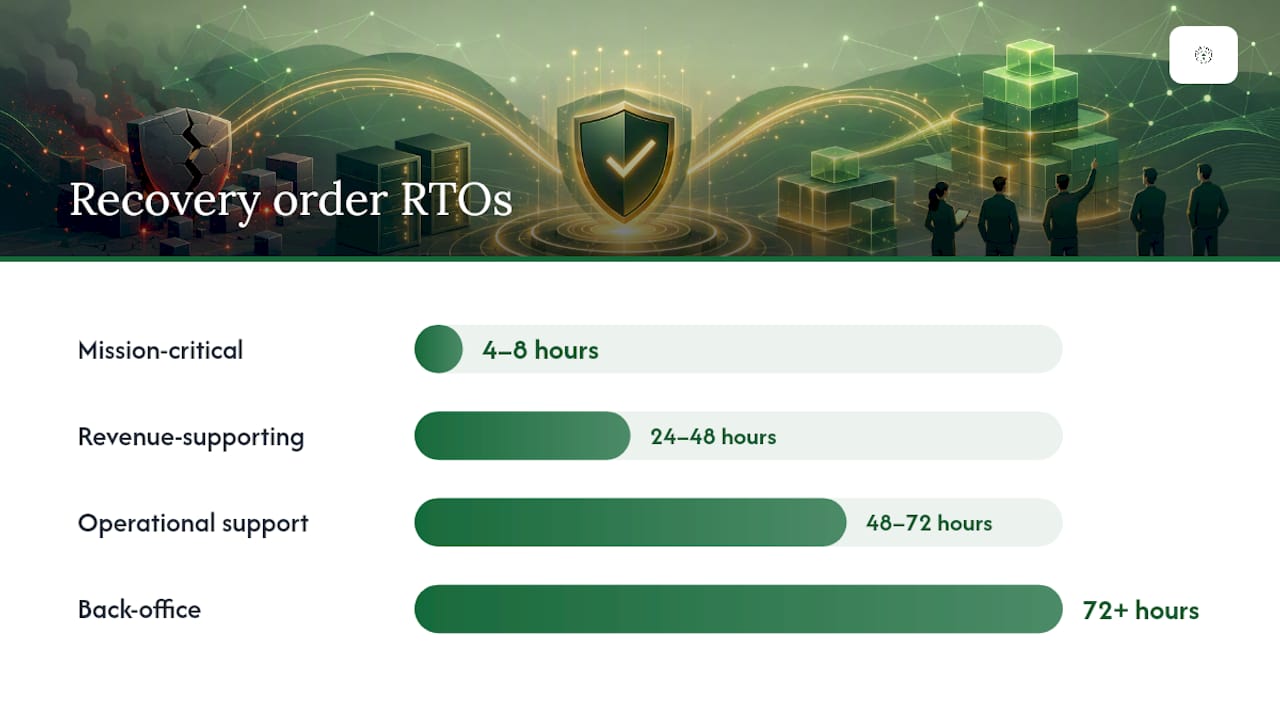
- Mission-critical systems (billing, EHR, core line-of-business apps): RPO of 4 hours or less, RTO of 4–8 hours
- Revenue-supporting systems (CRM, email, file shares): RPO of 24 hours, RTO of 24–48 hours
- Back-office systems (HR, reporting, internal wikis): RPO of 48–72 hours, RTO of 72 hours or more
These are starting targets. Your actual numbers depend on contractual obligations, regulatory requirements, and what your business can genuinely tolerate. For regulated environments like dental or medical practices, backup solutions designed for clinical settings often carry HIPAA-specific retention and encryption requirements that tighten these targets considerably.
Restore testing checklist
A backup that has never been tested is a hypothesis, not a recovery asset. Test restores on this cadence:
- Monthly: Restore a single file or folder from each backup destination and verify integrity
- Quarterly: Restore a full system image to an isolated test environment and confirm the application launches and data is readable
- Annually: Conduct a full tabletop or live restore exercise that simulates a ransomware scenario end to end
TechTarget's recovery guidance notes that organizations without validated backups face recovery timelines that stretch from days into weeks. Tested backups compress that window.
Pro Tip: Store offline encryption keys, backup software installers, and any required license keys alongside your offline image media. Standard system images can fail when hardware or hypervisor differences exist between the original and recovery environment. Having the installer and license on the same offline drive means you can rebuild even if your software management system is also encrypted.
For a broader look at backup best practices for small businesses, the fundamentals of frequency, retention, and verification apply across every industry.
How do you rebuild systems safely after a ransomware attack?
Rebuilding before you have confirmed the attacker is evicted is the most expensive mistake in ransomware recovery. Teams that skip threat hunting and go straight to restore often find themselves re-encrypted within days. The CISA/MS-ISAC guidance is clear: triage, preserve evidence, and initiate threat hunting before any wide rebuild begins.
Sequenced restore procedure
- Establish a clean network segment. Stand up an isolated VLAN or rebuild environment with no connectivity to the compromised production network. This is where all restored systems live until they pass validation.
- Rebuild the control plane first. Restore or rebuild domain controllers, DNS, and DHCP from verified clean images. Everything else depends on identity infrastructure being trustworthy.
- Restore identity services and rotate all credentials. Rebuild Active Directory from a known-clean backup or a fresh install with exported configuration. Reset every privileged account password, revoke all service account tokens, and rotate API keys. Identity-first recovery prevents the attacker from simply logging back in with cached credentials after you restore systems.
- Restore applications and data in priority order. Work from your recovery order matrix (see the next section). Restore mission-critical systems first, validate them, then proceed to the next tier.
- Validate before reconnecting. Each restored system must pass integrity checks, a malware scan with updated signatures, and a smoke test of core functionality before it joins the production network.
Credential rotation specifics
Credential rotation is not optional and not partial. Accounts to rotate include: all domain admin and local admin accounts, service accounts and scheduled task credentials, VPN and remote access credentials, cloud console and API keys, and any shared passwords stored in compromised password managers. Attackers who maintain a foothold through a single overlooked service account can re-encrypt within hours of your restore completing.
CISA recommends using infrastructure-as-code (IaC) and version-controlled golden images to speed rebuilds and maintain auditable templates. When your server configuration is defined in code and stored offline, rebuilding a server becomes a repeatable, documented process rather than a manual reconstruction from memory.
Pro Tip: Use an ephemeral test VLAN or isolated lab to validate every restore before reconnecting to production. Run a full malware scan, confirm application functionality, and check that no unexpected outbound connections are initiated. Systems that pass in isolation are far less likely to reintroduce the threat when they rejoin the production network.
How do you prioritize systems and set realistic recovery timelines?
Not every system can come back at once, and attempting to restore everything simultaneously usually means nothing comes back cleanly. A recovery order matrix forces the discipline of deciding in advance which systems matter most, so the team is not making those calls under pressure during an active incident.
Recovery order matrix
| Priority tier | System category | Example systems | Target RTO |
|---|---|---|---|
| 1 | Mission-critical | Core line-of-business app, payment processing, EHR | 4–8 hours |
| 2 | Revenue-supporting | Email, CRM, file shares, VoIP | 24–48 hours |
| 3 | Operational support | HR systems, internal reporting, project tools | 48–72 hours |
| 4 | Back-office | Archival systems, non-critical databases | 72+ hours |
Dependency mapping
Restoring systems out of sequence is a common cause of extended downtime. Before the incident, map dependencies so the team knows which systems must be online before others can function:
- Identity services (Active Directory, SSO) must be restored before any application that authenticates against them
- DNS and DHCP must be functional before domain-joined systems can communicate
- Database servers must be restored before the applications that query them
- File servers must be accessible before any application that reads from shared storage
Document these dependencies in your plan and review them annually. A manufacturing client with production scheduling software that depends on a shared SQL instance needs that database tier restored before the scheduling application, regardless of which one appears more "critical" on the surface. For manufacturing-specific recovery sequencing, IT disaster recovery planning for manufacturers covers the dependency considerations that apply to operational technology environments.
What forensic evidence should you collect during a ransomware incident?
Forensic evidence serves three purposes: it helps your IR team understand the attack path so you can close the vulnerability, it satisfies law enforcement and insurance documentation requirements, and it supports breach notification decisions. Collecting it properly from the start avoids the situation where you have recovered your systems but cannot answer the questions your insurer or regulator is asking.
High-value forensic artifacts
- Memory images from all live affected systems (captured before shutdown)
- Disk images of encrypted systems, preserved before any remediation
- Windows Event Logs, Security logs, and PowerShell logs from affected hosts
- Firewall and proxy logs covering at least 90 days before the incident
- Authentication logs from Active Directory, VPN, and cloud consoles
- The ransom note in its original file location (screenshot and copy)
- Any phishing emails or suspicious attachments identified as the initial vector
- EDR telemetry exported from your endpoint security platform
- Network flow data showing lateral movement and exfiltration patterns
Chain of custody
Every artifact collected must be documented: who collected it, when, from which system, using which tool, and where it is stored. Use write-blocking hardware when imaging disks to prevent accidental modification. Store forensic copies on media that is separate from your recovery environment. This documentation is what makes evidence admissible and useful to law enforcement or insurance adjusters.
When to escalate to specialized forensics
Engage a specialized IR forensics vendor or notify law enforcement when:
- Data exfiltration is confirmed or suspected (large outbound transfers, attacker-operated staging directories)
- Regulated data (PHI, PII, payment card data) is on affected systems
- The attack appears to involve a known ransomware-as-a-service (RaaS) group
- Your internal team lacks the tooling or expertise to conduct memory forensics
CISA's StopRansomware guidance notes that adversaries frequently exfiltrate data before triggering encryption, making every ransomware event a potential data breach that requires notification planning regardless of whether you pay or recover from backups.
Who does what during a ransomware incident?
Ransomware response fails when everyone is waiting for someone else to make a decision. Define roles before the incident, not during it. The incident commander owns all decisions; everyone else executes within their lane and escalates to the commander when they hit a decision point outside their authority.
| Role | Primary responsibilities |
|---|---|
| Incident commander | Owns all decisions; coordinates all workstreams; approves external communications |
| Technical lead | Directs containment, forensics, and rebuild activities; manages IR vendor relationship |
| Communications lead | Drafts internal and external statements; manages media and customer inquiries |
| Legal/HR liaison | Advises on notification obligations, employment issues, and regulatory reporting |
| Finance/executive sponsor | Approves expenditures; makes ransom payment decisions if applicable |
Communication templates and holding statements
Out-of-band communication is non-negotiable. If your primary email and collaboration platforms are encrypted or suspected to be compromised, the team needs pre-established alternatives: a phone tree, personal email addresses, a secure messaging app like Signal, or a pre-configured out-of-band Slack workspace on a separate domain. CISA's incident response playbook guidance recommends keeping an offline copy of the communications plan precisely because primary platforms may be unavailable.
Internal staff holding statement (template): Customer/partner holding statement (template):
Third-party engagement checklist
- IR vendor: Provide network diagrams, asset inventory, EDR access, and log access. Have your retainer agreement and emergency contact number accessible offline.
- Cyber insurance carrier: Notify within the timeframe specified in your policy (often 24–72 hours). Document all costs from the first hour. Most policies require pre-approval before engaging IR vendors or making ransom payments.
- Law enforcement: Contact the FBI's Internet Crime Complaint Center (IC3) at ic3.gov or your local FBI field office. Reporting does not obligate you to any specific action and may provide access to decryption keys if the group has been disrupted.
- Regulators: HIPAA-covered entities must notify HHS within 60 days of discovery. State breach notification laws vary but commonly require notification within 30–72 hours when PII is involved.
Should you pay the ransom? A decision framework
Ransom payment is a business decision, not a technical one, and it carries legal, financial, and operational consequences that must be evaluated before anyone authorizes a transfer. The decision framework below is not a recommendation to pay or not pay. It is a structure for making the decision with documented, defensible reasoning.
Decision framework
- Who decides: The incident commander with explicit approval from the executive sponsor and legal counsel. Verbal-only decisions on ransom payment are unacceptable; document every discussion, approval, and rejection in writing.
- Legal constraints: Paying ransom to a sanctioned entity is a potential violation of OFAC regulations. Before any payment, legal counsel must confirm the ransomware group is not on the OFAC Specially Designated Nationals list. Your IR vendor or insurer can often assist with this check.
- Insurer position: Many cyber insurance policies cover ransom payments but require pre-authorization. Paying without insurer approval may void coverage. Confirm the policy terms before the incident.
- Forensic confidence: If your IR team has not completed threat hunting, paying ransom does not guarantee the attacker has been evicted. Re-encryption after payment is documented and common.
- Backup availability: If verified, clean offline backups exist and cover the affected systems, payment is rarely the fastest path to recovery. If backups are unavailable or compromised, the calculus changes.
- Decryption reliability: Ransomware decryptors provided by attackers are not always reliable. Some corrupt data during decryption. Factor this into the decision alongside the cost of restoration from backups.
Pro Tip: Document every decision, every approval, and every rejection in a timestamped incident log from the first minute of the response. If the incident results in litigation, regulatory investigation, or an insurance dispute, verbal agreements and informal Slack messages are not sufficient. A written record protects the organization and the individuals who made the calls.
How do you test and maintain a ransomware recovery plan?
A plan that has never been tested is a plan that will fail when it matters. TechTarget's recovery guidance recommends regular reviews, rehearsals, and live restore testing to validate RTOs and RPOs against reality. The gap between what the plan says and what the team can actually execute is only visible through testing.
Testing calendar
- Quarterly tabletop exercise: Walk the incident response team through a simulated ransomware scenario using injects (new information introduced during the exercise). Focus on decision points, communication flows, and role clarity. No technical systems required.
- Semi-annual restore drill: Restore a full system image from offline backup to an isolated environment. Time the restore against your documented RTO. Verify data integrity and application functionality.
- Annual full-scale exercise: Combine a tabletop with a live restore drill. Include third-party participants (IR vendor, legal counsel, insurance contact) where possible. Test out-of-band communications.
Exercise types and when to use them
Tabletop exercises are low-cost and high-value for testing decision-making and communication. They reveal gaps in role clarity and escalation paths without requiring any system downtime. Red-team-assisted exercises add realism by having a security team simulate attacker behavior, which surfaces gaps in detection and containment that tabletops miss. Live restore drills are the only way to validate that your backups actually work and that your documented RTO is achievable.
After-action review checklist
After every test or real incident, conduct a structured after-action review within five business days:
- What worked as documented?
- What failed or deviated from the plan?
- What gaps in tooling, access, or knowledge slowed the response?
- What changes to the plan are required before the next exercise?
- Who owns each remediation item, and what is the deadline?
Update the plan immediately after the review. A plan that is not updated after a test is not a living document; it is a snapshot of how you thought things would work before you found out they did not.
Why do ransomware recovery plans fail in practice?
The most common failure is not a missing section in the plan document. It is a gap between what the plan assumes and what the environment actually looks like on the day of the incident. These failure modes appear repeatedly across real-world recoveries.
- Untested backups: The backup job ran successfully for months, but no one ever restored from it. On recovery day, the backup is corrupt, incomplete, or stored in a format the current software cannot read. Mitigation: monthly file-level restores, quarterly full-image restores.
- Credential exposure: The attacker compromised a domain admin account weeks before encryption. The recovery team restores systems using the same compromised credentials, and the attacker re-enters within hours. Mitigation: full credential rotation before any system reconnects to production.
- Inadequate evidence capture: The team powers off affected systems immediately to stop the spread, destroying memory artifacts and encryption keys that could have identified the attacker or enabled decryption without payment. Mitigation: train at least two team members on memory capture tools and keep those tools on offline USB drives.
- Single-cloud lock-in: All backups live in the same cloud tenant as production. The attacker compromises the cloud console and deletes backup vaults before triggering encryption. Mitigation: immutable object storage with a separate administrative account, or an offline copy on a different medium.
- Missing installers and licenses: The golden image restores successfully, but the application requires a license key stored in the encrypted environment or a software management system that is also offline. Mitigation: store installers, license keys, and activation codes with offline backup media.
- Plan stored only on the network: The incident response plan is a SharePoint document. SharePoint is encrypted. No one can access the plan. Mitigation: keep a printed copy and an offline digital copy (USB or printed binder) accessible to the incident commander and technical lead.
Small businesses face a specific version of the single-cloud problem. When budget constraints push all backup copies into the same Microsoft 365 tenant or the same cloud storage account as production data, a single compromised admin credential can wipe both. Immutable cloud snapshots or multi-cloud copies give the best cost-to-recovery outcome for resource-constrained teams.
What hardening steps should you take after recovering from ransomware?
Recovery is not the end of the process. The same vulnerabilities that allowed the initial compromise still exist until you close them. Post-recovery hardening has two phases: immediate actions in the first 30 days to close the most critical gaps, and medium-term actions to build durable resilience.
Short-term hardening (0–30 days)
- Patch everything. Apply all outstanding OS and application patches to every system before it reconnects to production. The initial compromise often exploited a known, patchable vulnerability.
- Enable MFA on all external-facing accounts. VPN, Microsoft 365, cloud consoles, and remote desktop access should require multi-factor authentication before the recovered environment goes live.
- Enforce least privilege. Audit every account and remove admin rights that are not required for the account's function. Most ransomware spreads laterally using over-privileged accounts.
- Segment the network. Isolate critical systems into separate VLANs with firewall rules that limit lateral movement. A flat network where every device can reach every other device is a ransomware propagation environment.
- Deploy or update EDR. If the incident revealed gaps in endpoint visibility, deploy an EDR solution with behavioral detection before systems return to production.
Medium-term hardening (30–180 days)
- Implement a privileged access workstation (PAW) or jump server for all administrative tasks
- Deploy a Security Information and Event Management (SIEM) solution or managed detection and response (MDR) service for continuous log monitoring
- Conduct a formal vulnerability assessment and penetration test to identify remaining attack surface
- Review and update the incident response plan based on lessons learned
- Establish a formal patch management cadence with defined SLAs by vulnerability severity
Pro Tip: Use IaC templates and version-controlled golden images to make every rebuild repeatable and auditable. When your server configurations are defined in code stored offline, you can rebuild a compromised environment to a known-good state in hours rather than days, and you have a documented record of exactly what was deployed. This also makes post-incident audits significantly faster.
For a prioritized checklist of infrastructure improvements relevant to small businesses, the 2026 small business tech upgrade checklist covers the hardware and software investments that most directly reduce recovery time and attack surface.
How does supply chain risk affect your recovery plan?
A ransomware incident does not always originate inside your organization. Managed service providers, software vendors, and third-party contractors with access to your environment are common entry points. The 2020 SolarWinds compromise and subsequent supply chain attacks demonstrated that a trusted vendor's update mechanism can become an attacker's delivery vehicle.
During recovery, supply chain risk cuts in two directions. First, your recovery may depend on a vendor whose own environment is compromised or unavailable. If your backup software vendor, cloud provider, or IR retainer firm is also dealing with an incident, your recovery timeline extends. Second, the attacker may have entered through a third-party connection that remains active during your recovery, allowing re-entry after you restore.
Practical mitigations for small businesses:
- Audit third-party access before reconnecting systems. Identify every vendor, contractor, and MSP with credentials or VPN access to your environment. Revoke all third-party access during containment and re-grant it only after credential rotation and validation.
- Review vendor security posture. Ask your critical vendors for their own incident response and business continuity documentation. A vendor who cannot produce these documents is a risk to your recovery.
- Maintain a vendor contact list offline. If your primary vendor portal is encrypted, you need phone numbers and emergency contacts for critical vendors stored somewhere the attacker cannot reach.
- Include vendor dependencies in your recovery order matrix. If your EHR system requires a vendor-hosted authentication service, that dependency must appear in your recovery sequencing.
How do you support employees after a ransomware attack?
The technical recovery gets most of the attention, but the human cost of a ransomware incident is real and often underestimated. Employees who witnessed the attack, worked through the response, or face uncertainty about their personal data being exposed experience genuine stress. Ignoring that stress produces turnover, reduced productivity, and a team that is less prepared for the next incident.
Practical steps for supporting staff during and after recovery:
- Communicate honestly and frequently. Employees who receive regular updates, even brief ones, handle uncertainty better than those left to speculate. Use your out-of-band channel to send status updates every few hours during the active incident.
- Acknowledge the difficulty. A brief acknowledgment from leadership that the situation is stressful and that the team's effort is recognized costs nothing and matters more than most managers expect.
- Provide clear guidance on personal data exposure. If employee PII was on affected systems, tell them directly, explain what was exposed, and provide concrete steps they can take (credit monitoring, password changes). Vague reassurances create more anxiety than honest disclosure.
- Debrief the response team. The people who worked through the incident, often for days with little sleep, need a structured debrief that acknowledges what they did well before moving into what needs to improve. An after-action review that opens with blame destroys the psychological safety needed for honest retrospectives.
- Consider professional support resources. For incidents involving significant data loss, extended downtime, or public exposure, an Employee Assistance Program (EAP) referral gives staff access to professional support without requiring them to self-identify as struggling.
The team that recovers well from one incident is the team that responds better to the next one. That outcome depends on people feeling supported, not just systems being restored.
What most organizations get wrong about ransomware recovery
The conventional wisdom in ransomware recovery focuses heavily on technology: better backups, faster restores, more detection tools. Those things matter. But the failure modes that actually derail recoveries in practice are almost always organizational, not technical.
The plan exists as a document. The team has never run through it. The backup credentials are stored in the same password manager that just got encrypted. The incident commander role is assigned to the IT director, who is also the only person who knows how to restore from the backup system, which means the same person is making decisions and doing technical work simultaneously under extreme pressure. These are not exotic failure modes. They are the norm.
What works consistently for small businesses is a short, printed, offline playbook that covers the first four hours in enough detail that a competent team member who is not the IT director can execute it. Not a 40-page policy document. A laminated one-pager with phone numbers, isolation steps, and backup access instructions. Pair that with quarterly tabletop exercises where the IT director is deliberately excluded from one scenario, forcing the team to operate without their primary technical resource.
The other underappreciated reality is that protecting your business from ransomware attacks before an incident is dramatically cheaper than recovering after one. Prevention controls like MFA, network segmentation, and phishing-resistant email filtering reduce the probability of reaching the recovery plan at all. The recovery plan is essential, but it is the last line of defense, not the first.

Greatplainsnetworking helps small businesses build and test recovery-ready IT
For small businesses in Norman, Moore, and Oklahoma City, building a ransomware recovery plan from scratch while running day-to-day operations is genuinely difficult. Greatplainsnetworking delivers the managed IT support that makes recovery preparedness practical rather than theoretical: 24/7 monitoring to catch threats before encryption triggers, managed backup and recovery services with verified offline copies and tested restores, and incident response planning that includes a documented playbook and tabletop exercises tailored to your environment.

An engagement starts with a recovery readiness assessment that identifies gaps in your current backup architecture, documents your critical system dependencies, and produces a prioritized recovery playbook your team can actually use. No long-term contracts, no jargon, and same-day response when it counts. Contact Greatplainsnetworking to schedule your assessment and find out exactly where your recovery plan stands before an attacker does.
Sources
The sources below were used to build this guide and are worth consulting directly for official checklists, regulatory guidance, and updated threat intelligence.
- CISA / MS-ISAC Ransomware Guide
- Ransomware risk management: A Cybersecurity Framework 2.0 community profile — NIST IR 8374r1
- Ransomware Recovery Plan: 5 Steps for 2026 Resilience — TierPoint