

A managed service provider is a company that takes over the ongoing monitoring, maintenance, and management of your IT systems under a subscription contract, rather than fixing things only after they break. The value comes from three sources: predictable monthly costs, proactive monitoring that catches problems before they cause downtime, and a service level agreement (SLA) that spells out exactly what response you get and when. Businesses typically bring in an MSP once IT complexity or security and compliance obligations outgrow what an internal team or occasional contractor can reasonably cover.
Key Takeaways
A managed service provider replaces reactive, hourly IT support with proactive monitoring, a subscription price, and an SLA that defines exactly what response you get.
| Point | Details |
|---|---|
| Definition | An MSP delivers ongoing IT monitoring and management under a subscription, unlike break/fix contractors billing hourly. |
| Core services | Expect monitoring, help desk, patching, backup, security, and network management as the standard stack. |
| Typical pricing | SMB managed IT commonly runs $100 to $250 per user monthly, plus onboarding fees. |
| Biggest risk | Broad system access requires strong contractual controls, documented runbooks, and clear exit terms. |
| Local option | Greatplainsnetworking offers 24/7 proactive monitoring, cybersecurity, and no long-term contracts for small businesses in the Oklahoma City metro area. |
Table of Contents
- What Is a Managed Service Provider, Exactly?
- What Do Managed Service Providers Actually Do?
- How Do Managed Service Providers Work Day to Day?
- Types of MSPs and Who They Fit Best
- What Benefits Does an MSP Deliver?
- What Are the Risks of Hiring an MSP?
- In-House IT vs. Break/Fix vs. Managed Services
- How Much Does a Managed Service Provider Cost?
- How Do You Choose the Right MSP?
- Turning an MSP Into a Strategic Partner
- An Operator's View on What Actually Happens After You Sign
- Get Proactive IT Support Built for Small Business
- Frequently Asked Questions
- Sources
What Is a Managed Service Provider, Exactly?
Gartner defines an MSP as an organization that delivers network, application, infrastructure, and security services through ongoing, active management under a subscription model. That single word, "ongoing," is what separates managed services from everything else in the IT support market.
A break/fix contractor shows up when something is broken, bills you by the hour, and leaves once it's fixed. There's no monitoring in between visits, so a failing hard drive or an expired SSL certificate sits unnoticed until it causes an outage. A software vendor sells you a tool, not a service. Someone still has to configure it, patch it, and watch it. An MSP, by contrast, takes on responsibility for keeping systems running and typically charges an upfront onboarding fee plus a flat or near-fixed monthly rate, according to Wikipedia's overview of managed services.
A standard MSP contract usually spells out:
- SLA metrics for response time, resolution time, and system uptime
- A one-time onboarding or setup fee separate from the monthly rate
- Contract term length often spans multiple months, though some providers offer month-to-month options
- Defined scope of covered devices, users, and services
- A documented change-order process for work that falls outside that scope
What Do Managed Service Providers Actually Do?
The service list varies by provider, but most managed IT contracts converge on the same core stack. Here's what you should expect to see covered:
- Remote monitoring of servers, workstations, and network devices to catch failures early
- Help desk support for day-to-day user issues, usually with phone, email, or ticketing access
- Patch management to keep operating systems and software current against known vulnerabilities
- Backup and disaster recovery to restore data and systems after ransomware, hardware failure, or human error
- Endpoint security including antivirus, endpoint detection and response, and device encryption
- Network management covering firewalls, Wi-Fi, VPNs, and internet connectivity
- Cloud management for platforms like Microsoft 365, Azure, or AWS, since many MSPs now manage hybrid environments spanning on-premises and cloud infrastructure, per Cloudian's guide to managed service providers
- Vendor management, acting as the point of contact for your internet provider, software vendors, and hardware suppliers
- Strategic IT planning, including budget forecasting and technology roadmaps
Not every provider covers every item at the same depth. Some run a full managed model handling everything above; others operate co-managed arrangements that support an existing internal IT staff rather than replace it. If your business handles protected health information, cardholder data, or federal contracting work, confirm the provider has direct experience with HIPAA, PCI, or CMMC requirements before you assume "IT support" covers compliance.
How Do Managed Service Providers Work Day to Day?

Behind the scenes, most MSPs run on a remote monitoring and management (RMM) platform that watches your servers, endpoints, and network in real time, paired with a ticketing system that logs every issue from detection to resolution. That combination is what makes 24/7 coverage possible without someone physically watching a screen around the clock.
Your SLA is the contract that turns that monitoring into an enforceable promise. Look for it to define:
- Response time by severity level (a server outage should get a faster response than a printer glitch)
- Target resolution time for each severity tier
- Uptime guarantees, often expressed as a percentage like 99.9%
- Escalation paths for issues the first-tier technician can't resolve alone
A typical workflow looks like this: the RMM platform flags an anomaly, a ticket opens automatically, a technician triages it against SLA severity levels, and unresolved issues escalate to senior engineers. Onboarding should end with full documentation handover, including network diagrams, credential storage, and asset inventories, so nothing lives only in one technician's head.
Types of MSPs and Who They Fit Best
Not all managed service providers look alike, and matching the specialization to your situation matters more than picking the biggest name.
- Generalist SMB MSPs cover the core stack described above and fit most small businesses with straightforward IT needs.
- Security-focused MSPs (MSSPs) emphasize threat detection, incident response, and compliance, and suit businesses handling sensitive data or facing regulatory scrutiny.
- Cloud-only MSPs specialize in platforms like Microsoft 365 or AWS and work well for businesses with little on-premises infrastructure left to manage.
- Vertical specialists focus on industries like healthcare or legal services, where compliance experience with frameworks like HIPAA isn't optional. General industry guidance consistently stresses matching a provider's specialization to your compliance needs, particularly in regulated verticals.
- Co-managed partners support an existing internal IT team rather than replace it, filling coverage gaps like after-hours monitoring.
What Benefits Does an MSP Deliver?
The case for managed services rests on outcomes you can measure, not just convenience.
- Predictable operating costs. A fixed monthly fee replaces the unpredictable swings of hourly billing, which makes IT spend easier to budget and forecast.
- Better uptime. Round-the-clock monitoring catches failing hardware, unusual network traffic, or failed backups before they turn into an outage your staff notices.
- Security you couldn't build alone. Enterprise-grade firewalls, endpoint detection, and dedicated security staff are usually out of reach for a small business hiring in-house, but they come standard with most managed contracts.
- Faster project execution. Cloud migrations, office moves, and system upgrades move faster with a team that already knows your environment, rather than starting from a cold assessment.
CompTIA's trend reporting points to growing demand for MSP services, driven largely by the security gap most small businesses can't close on their own.
What Are the Risks of Hiring an MSP?
Handing over IT management isn't risk-free, and pretending otherwise sets you up for a bad surprise later.
The biggest concern is access. An MSP typically needs administrative rights across your network, which means you're trusting their internal security practices as much as your own. Vendor lock-in is the second risk: vague exit terms or monitoring tools that only the provider can access make switching expensive later. A third risk is simple mismatch, paying for enterprise-grade managed services when your environment is small enough that a local technician on an hourly basis would cover it just fine.
Reasonable controls include:
- Role-based access controls and a signed NDA covering staff who touch your systems
- Documented runbooks that describe how your environment is configured, not just what the provider remembers
- A written exit and transition clause that guarantees you retain your technical documentation
- Regular business reviews rather than a set-and-forget relationship
- Proof the provider tests its own backups and can produce SOC 2 or ISO 27001 evidence on request
In-House IT vs. Break/Fix vs. Managed Services
The right model depends on how complex your environment is and how much downtime you can tolerate.
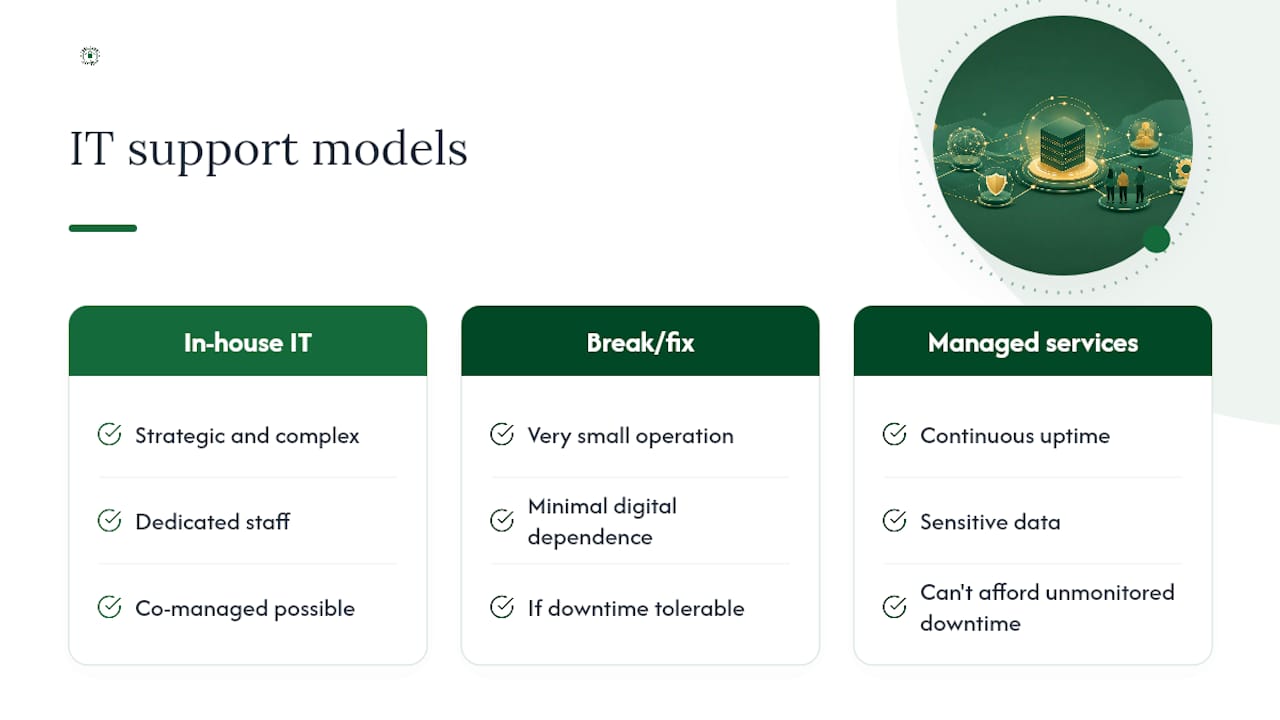
Keep IT in-house when your needs are strategic and complex enough to justify dedicated staff. Break/fix can still work for a very small operation with minimal digital dependence. Once your business relies on continuous uptime, handles sensitive data, or simply can't afford unmonitored downtime, an MSP becomes the more defensible choice. Co-managed arrangements split the difference for internal teams that need extra hands or after-hours coverage.
How Much Does a Managed Service Provider Cost?
MSP pricing usually follows one of a few structures: per-user or per-device subscriptions, tiered bundles (basic monitoring versus full security stack), flat-fee pricing for a defined scope, or project-based fees for one-time work like a cloud migration.
What drives the price up or down:
- Number of users and devices under management
- How much security and compliance work is included
- Backup and disaster recovery requirements, including how often restores are tested
- Cloud spend and the complexity of your cloud environment
- SLA tightness, since a 15-minute response guarantee costs more than a next-business-day one
As a benchmark, industry guides put comprehensive small-business managed IT, including monitoring, help desk, patching, backup, and security, at roughly $100 to $250 per user per month, with onboarding fees ranging from a couple thousand dollars up to $10,000 depending on how much cleanup and documentation the initial assessment requires. Treat any quote well outside that range, in either direction, as a reason to ask more questions rather than sign immediately.
How Do You Choose the Right MSP?
Evaluating providers gets easier with a checklist instead of a gut feeling. Work through these steps in order:
- Define your scope in writing before you talk to a single vendor: devices, users, locations, and compliance requirements.
- Request sample SLAs and read the severity tiers closely, not just the marketing summary.
- Ask for SOC 2 or ISO 27001 evidence, or documentation of an equivalent security review.
- Request case studies or references from businesses in your industry, particularly if you're regulated.
- Ask how they verify backups, and whether they can show you a recent successful restore test.
- Confirm how staff access controls work internally, including background checks and role-based permissions.
During vetting, push for specific answers on:
- Guaranteed response times by severity level
- Escalation procedures when the first technician can't resolve an issue
- Realistic onboarding timeline, not just "a few weeks"
- How change orders outside the contracted scope get priced
- Support hours and whether 24/7 coverage is real or an add-on
- Which RMM and ticketing tools they use, and whether you get visibility into them
Watch for red flags: contracts with aggressive lock-in language and no clear exit path, monitoring tools you can't get read access to, SLAs written in vague language like "prompt response" instead of measurable times, and providers who can't produce a sample incident report. A provider unwilling to share documentation or monitoring data on request is signaling a relationship built on dependency, not partnership.
Turning an MSP Into a Strategic Partner
The businesses that get the most from managed services treat the relationship as ongoing collaboration, not a vendor they call when something breaks. Bring your MSP into planning conversations early. A provider who only hears about a office expansion or new compliance requirement after the fact can't plan the infrastructure around it.
Schedule quarterly business reviews to walk through open tickets, upcoming projects, and whether current spending still matches your risk profile. Track strategic value with concrete measures: uptime percentage, how fast new projects move from request to completion, and whether security incidents are trending down.
Pro Tip: Before signing, ask specifically who owns your technical documentation if the relationship ends. A provider confident in their service will agree to full documentation transfer and a reasonable exit window without hesitation.
An Operator's View on What Actually Happens After You Sign
Most onboarding follows a predictable arc, even though every environment differs in the details. The first two to four weeks go to discovery: inventorying devices, documenting network architecture, and migrating monitoring agents onto every endpoint. Months two and three are where the real value shows up, as recurring issues that used to eat staff time start getting resolved before anyone notices them.
What surprises new clients most isn't the technology. It's how much clarity comes from finally having documented systems instead of tribal knowledge sitting in one person's head. If you want to see what that transition looks like for businesses your size, ask any provider you're evaluating for references or a sample onboarding plan.
Get Proactive IT Support Built for Small Business
If you've read this far comparing in-house staffing, break/fix contractors, and full managed service models, the tradeoffs probably feel familiar: cost predictability versus control, speed versus depth of expertise. Greatplainsnetworking built its model specifically around what small businesses in Norman, Moore, and Oklahoma City actually need, which is 24/7 monitoring that catches problems before they cause a shutdown, explained in plain language instead of technical jargon nobody has time to decode.

Clients ranging from dental practices to law firms rely on Greatplainsnetworking for cybersecurity protection against ransomware and phishing, rapid data recovery when something does go wrong, and IT plans customized to their specific compliance needs, whether that's HIPAA, IRS requirements, or CMMC. Same-day response times and no long-term contracts mean you're not locked into a relationship that stops serving you. If your current setup leaves you guessing whether an issue is being caught before it becomes a crisis, request a managed IT assessment and see what proactive monitoring actually looks like for your business.
Frequently Asked Questions
What is a managed service provider in simple terms? A managed service provider is a company you pay a monthly fee to monitor, maintain, and support your IT systems proactively, rather than only fixing problems after they happen.
What's the difference between an MSP and regular IT support? Regular or break/fix IT support responds only when something breaks and bills by the hour. An MSP monitors your systems continuously and works under an SLA that guarantees specific response and resolution times.
Are managed service providers worth it for small businesses? For businesses with meaningful security exposure, compliance obligations, or low tolerance for downtime, yes. Very small or simple environments sometimes get by fine with occasional hourly technician support until complexity grows.
How long does MSP onboarding typically take? Most onboarding runs two to four weeks for discovery, documentation, and monitoring agent deployment, with the full value becoming apparent by the second or third month.
What should I look for when choosing an MSP? Prioritize clear SLAs, SOC 2 or ISO 27001 evidence, references from your industry, proof of tested backups, and a contract with a reasonable exit clause rather than aggressive lock-in terms.
Sources
- Definition of Managed Service Provider (MSP) - IT Glossary - Gartner
- Managed service provider - Wikipedia
- Managed Service Providers: Challenges and Considerations - Cloudian