

Outsourcing IT support is the process by which businesses delegate technology management and help desk services to external specialists, enabling measurable cost savings and improved operational efficiency. The industry term for this model is managed IT services, delivered by a managed service provider (MSP). 76% of organizations rely on some form of IT outsourcing to manage their technology operations. That number reflects a clear market consensus: internal IT teams alone cannot keep pace with modern technology demands, security threats, and the cost pressures small businesses face every day. For business owners in Norman, Moore, and Oklahoma City, understanding why businesses outsource IT support is the first step toward making a decision that protects both productivity and the bottom line.
Why businesses outsource IT support: the core reasons
The decision to outsource IT support comes down to four practical drivers: cost control, access to specialized skills, scalability, and round-the-clock coverage. Each one addresses a gap that internal teams consistently struggle to fill.
Cost control is the most immediate motivator. Maintaining a full-time internal IT employee costs far more than a salary line item. Hidden internal IT costs include recruitment fees of 15–25% of first-year salary, ongoing training, software license fees, and lost productivity every time an issue goes unresolved. Businesses routinely underestimate these expenses until they calculate the true cost of ownership. An MSP replaces that unpredictable overhead with a fixed monthly fee.

Specialized expertise is the second driver. Modern IT environments involve cybersecurity, cloud infrastructure, compliance requirements, and endpoint management. Modern IT complexity requires specialized skills that go well beyond what a generalist internal hire can provide. A single internal employee cannot realistically hold certifications across all of these disciplines. An MSP brings a team of specialists, each focused on a specific domain.
The remaining two drivers are scalability and 24/7 coverage:
- Scalability: An MSP adjusts support capacity as your business grows or contracts, without the delay of hiring or the cost of layoffs.
- 24/7 monitoring: Internal staff work business hours. MSPs monitor systems around the clock, catching failures before they become outages.
- Faster resolution: Specialist teams resolve incidents faster than generalist employees because they have seen the same problems across dozens of client environments.
- Compliance support: Industries like healthcare and legal services face strict data regulations. MSPs with compliance experience reduce the risk of costly violations.
Pro Tip: Before signing with any MSP, ask for a documented service level agreement (SLA) that specifies response times and resolution targets. A provider without a written SLA is a provider without accountability.
How does outsourcing IT improve operational efficiency?
The shift from reactive to proactive IT management is where outsourcing delivers its most visible operational impact. Reactive IT means you call for help after something breaks. Proactive IT means problems are identified and resolved before your staff ever notices them.
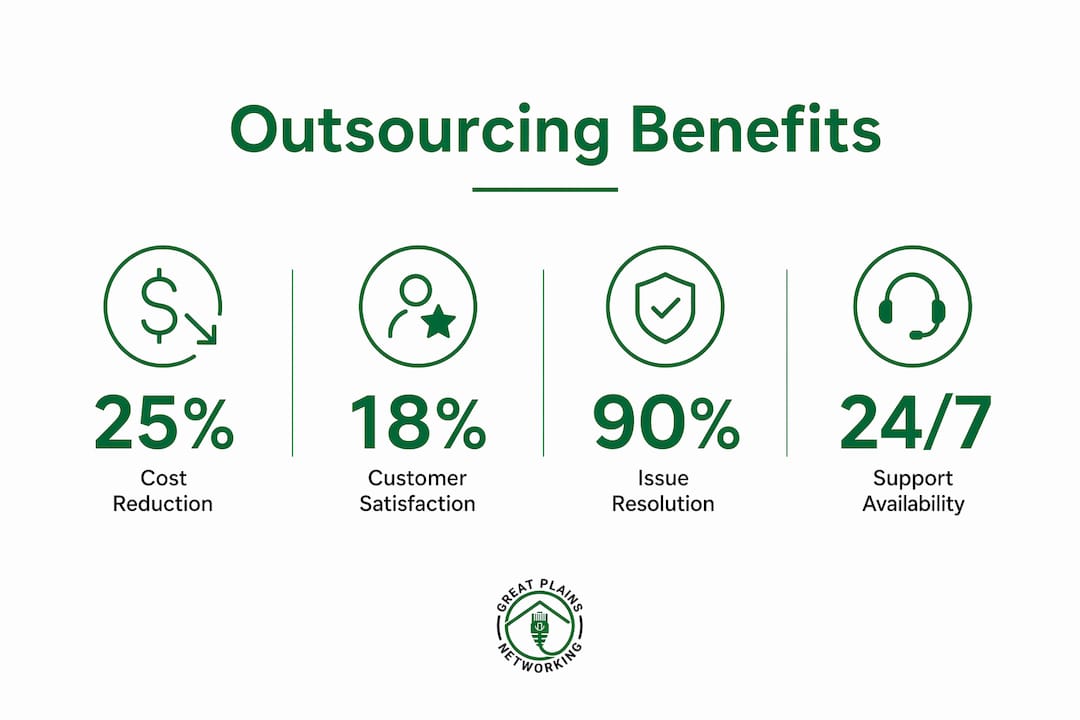
Outsourced IT providers deliver 24/7 monitoring that prevents issues before they cause downtime. That prevention directly reduces revenue leakage. A law firm that loses access to its case management software for two hours loses billable time that cannot be recovered. A dental practice with a failed scheduling system turns away patients. Downtime is not just an IT problem. It is a revenue problem.
The efficiency gains extend beyond uptime. Here is how the improvement typically unfolds in the first year of outsourcing:
- Baseline audit: The MSP documents your existing environment, identifies vulnerabilities, and standardizes configurations.
- Monitoring activation: Automated tools begin tracking system health, security events, and performance metrics in real time.
- Incident reduction: Proactive patching and monitoring reduce the volume of support tickets your staff submits.
- Productivity recovery: Employees spend less time waiting for IT fixes and more time on their actual work.
- Reporting and review: Monthly reports give you visibility into system performance, resolved issues, and upcoming risks.
Organizations outsourcing IT functions see an 18% improvement in internal customer satisfaction within the first year. That improvement reflects faster resolution times, fewer recurring problems, and staff confidence that IT issues will be handled without delay.
Pro Tip: Ask your MSP for monthly performance reports from day one. Visibility into ticket volume, resolution times, and system uptime turns your IT investment into a measurable business metric.
What are the real cost savings from outsourcing IT?
The financial case for outsourcing IT support is well documented and specific. Businesses outsourcing their IT help desk report 25%–40% average operational cost reductions, with efficient models achieving up to 70%. Those numbers represent real dollars redirected from overhead into growth.
The table below compares the typical cost structure of an internal IT setup against a managed IT services model for a small business with 10–25 employees.
| Cost Category | Internal IT Team | Managed IT Services |
|---|---|---|
| Staffing | $55,000–$85,000/year salary + benefits | Included in monthly flat fee |
| Recruitment and onboarding | $8,000–$20,000 per hire | None |
| Training and certifications | $2,000–$5,000/year | Included |
| Software and tooling licenses | $3,000–$8,000/year | Included |
| After-hours coverage | Overtime or on-call pay | Included |
| Total estimated annual cost | $68,000–$118,000+ | $12,000–$36,000/year |
Outsourcing IT shifts expenses from fixed overhead to variable costs and eliminates recruitment, training, and tooling expenses entirely. That shift also improves budget predictability. A fixed monthly fee lets you plan IT spending 12 months in advance, which is something an internal team with turnover, hardware failures, and emergency hires cannot provide.
The managed IT support benefits extend beyond direct cost savings. When your staff stops losing hours to IT problems, you recover productive capacity without adding headcount. That recovered time has real dollar value that never appears on an IT invoice but shows up in output.
What are the risks of outsourcing IT, and how do you manage them?
Outsourcing IT support is not without risk. Understanding those risks and how to address them is what separates a successful partnership from a frustrating one.
The most common concerns business owners raise are:
- Loss of proprietary knowledge: If your internal team handled IT, institutional knowledge about your systems may not transfer cleanly to an MSP.
- Transition friction: The first 90 days of any MSP engagement carry the highest risk of disruption as the provider audits and standardizes your environment.
- Accountability gaps: Without clear reporting, it can be difficult to know whether your MSP is performing.
- Vendor dependency: Relying entirely on one provider creates risk if that relationship ends.
Each of these risks has a practical mitigation. The transition risk is highest in the first 90 days when the MSP audits and standardizes the IT environment. Effective onboarding is the single most important factor in a successful outsourcing relationship. Business owners who stay involved during this period, providing environment access and defining operational priorities, see significantly better outcomes.
A professional MSP provides clear reporting and analytics, offering greater visibility and control than an isolated internal IT employee. Accountability gaps are a management problem, not an outsourcing problem. Require monthly reporting as a contract term.
For businesses that want to retain internal IT knowledge while gaining MSP scalability, the co-managed IT model is the most practical solution. Many businesses use a co-managed IT model to balance internal knowledge with outsourcing benefits. In this model, an internal IT coordinator handles strategic decisions and institutional knowledge while the MSP manages day-to-day monitoring, patching, and help desk support. The result is a proactive IT support structure that scales without sacrificing control.
Pro Tip: Document your IT environment thoroughly before onboarding any MSP. A network diagram, software inventory, and list of critical systems gives the provider a verified starting point and protects your institutional knowledge regardless of what happens to the relationship.
Key takeaways
Businesses outsource IT support primarily to reduce costs, access specialized expertise, and shift from reactive to proactive technology management.
| Point | Details |
|---|---|
| Cost reduction is measurable | Outsourcing IT delivers 25%–40% average operational cost reductions versus internal teams. |
| Proactive monitoring prevents downtime | MSPs monitor systems 24/7, resolving issues before they disrupt operations or revenue. |
| Hidden costs make internal IT expensive | Recruitment, training, and tooling add $68,000–$118,000+ annually for small businesses. |
| Co-managed IT reduces transition risk | Blending internal staff with MSP support preserves institutional knowledge while gaining scalability. |
| Onboarding determines long-term success | Active business owner involvement in the first 90 days is the strongest predictor of MSP performance. |
Why i think most businesses wait too long to outsource IT
Working alongside small businesses in Oklahoma, I have seen the same pattern repeat itself: a business owner tolerates slow systems, recurring outages, and a single overworked IT person for years before finally making a change. By the time they call us, they have already absorbed thousands of dollars in lost productivity and at least one serious security incident.
The hesitation usually comes from one of two places. Either the owner believes outsourcing means losing control, or they assume it is only for larger companies. Both assumptions are wrong. A well-structured MSP relationship gives you more visibility into your IT environment than most internal setups provide. Monthly reporting, documented SLAs, and defined escalation paths create accountability that a solo internal hire rarely delivers.
What I find most interesting is how the conversation shifts once a business owner sees the true cost comparison. The salary, benefits, recruitment fees, training costs, and after-hours gaps of an internal hire add up to a number that surprises most people. Outsourcing does not just save money. It replaces unpredictable overhead with a verified, fixed monthly cost.
The businesses that get the most from outsourcing treat their MSP as a partner, not a vendor. They stay engaged during onboarding, they review monthly reports, and they bring IT into conversations about growth and technology decisions. Outsourcing transforms IT from a cost center into a strategic asset when the business owner decides to use it that way. That decision does not happen automatically. It requires intention.
My advice: do not wait for a crisis to evaluate your IT setup. Run the numbers on your current costs, ask your provider for a documented SLA, and decide whether your current model is actually serving your business or just surviving alongside it.
— Nicholas
How Greatplainsnetworking helps small businesses take control of IT
Greatplainsnetworking provides managed IT support designed specifically for small businesses in Norman, Moore, and Oklahoma City. The service includes 24/7 monitoring, same-day response times, and a fixed monthly fee with no long-term contracts. Clients ranging from dental practices to law firms get proactive technology management in plain language, without technical jargon or surprise invoices. Greatplainsnetworking also covers cybersecurity and data recovery, giving local businesses a complete IT foundation without the overhead of an internal team. If you are ready to replace unpredictable IT costs with a verified, outcome-focused plan, Greatplainsnetworking is built for exactly that.
FAQ
What does it mean to outsource IT support?
Outsourcing IT support means hiring an external managed service provider to handle your technology management, help desk, monitoring, and security instead of maintaining an internal IT team. The MSP delivers these services for a fixed monthly fee.
How much can a business save by outsourcing IT?
Businesses outsourcing their IT help desk report 25%–40% average cost reductions, with efficient models reaching up to 70% savings compared to maintaining a full internal IT department.
Is outsourcing IT support right for small businesses?
Yes. Small businesses benefit most from outsourcing because they gain access to a full team of specialists at a fraction of the cost of a single full-time hire, along with 24/7 monitoring that internal staff cannot provide.
What is a co-managed IT model?
A co-managed IT model combines an internal IT coordinator with an external MSP. The internal person handles strategic decisions and institutional knowledge while the MSP manages daily monitoring, patching, and help desk operations.
How long does it take to see results after outsourcing IT?
Most businesses see measurable improvements within the first year. Organizations outsourcing IT functions report an 18% improvement in internal customer satisfaction within 12 months, driven by faster resolution times and fewer recurring issues.