

Many small business owners assume that remote IT support is just as effective as having a local team on call. That assumption carries real financial risk. Why local IT support matters becomes clear the moment a server goes down at 9 a.m. on a Monday and your remote provider starts a ticket queue while your staff sits idle. This article breaks down the concrete costs of poor IT support, explains the security and operational advantages of working with a local provider, and gives you a practical framework for evaluating your options.
Table of Contents
- Key takeaways
- Why local IT support matters for downtime costs
- Local IT support and cybersecurity response
- Communication, accountability, and customized service
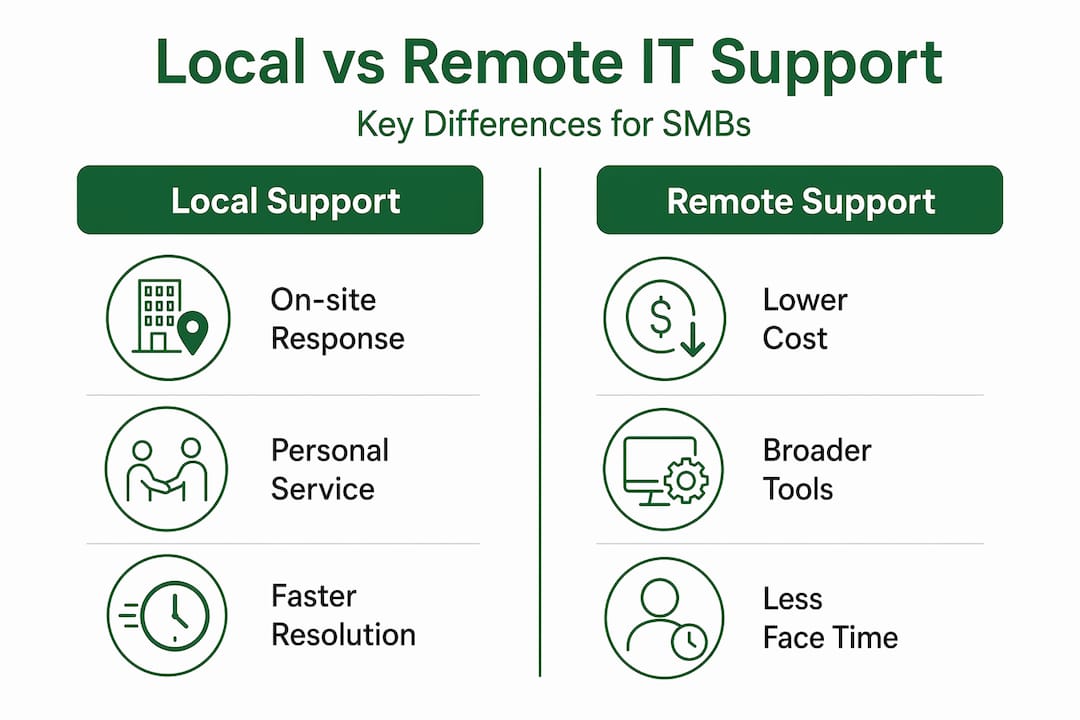
- Local vs. remote IT support: a direct comparison
- Practical steps to maximize local IT support
- My take on what most business owners get wrong
- How Greatplainsnetworking supports small businesses locally
- FAQ
Key takeaways
| Point | Details |
|---|---|
| Downtime is expensive | Small businesses can lose up to $10,000 per hour during critical outages, making fast response non-negotiable. |
| Ransomware targets SMBs | 88% of SMB breaches now involve ransomware, requiring rapid on-site containment that remote teams cannot always provide. |
| Local means accountability | Geographically close providers resolve issues faster and build trust through direct, face-to-face relationships. |
| Proactive beats reactive | Managed IT services convert unpredictable emergency costs into consistent, budgeted investments that protect your operations. |
| SLAs define outcomes | Clear service-level agreements focused on uptime and security are the most reliable way to hold any IT provider accountable. |
Why local IT support matters for downtime costs
Every minute your systems are offline costs money. Not in a vague, theoretical sense. Brief outages can cost SMBs up to $10,000 per hour in lost productivity, missed revenue, and recovery labor. For a dental practice in Norman or a law firm in Oklahoma City, even a two-hour outage on a busy Tuesday can wipe out an entire day's billing.
The problem with remote-only or break-fix support is that it stretches both Mean Time to Detect (MTTD) and Mean Time to Repair (MTTR). A remote technician diagnosing a hardware failure from another state cannot physically inspect the server, swap a failed drive, or verify that a network switch is the actual culprit. That triage delay alone can add hours to your recovery window.
Local IT support compresses that window significantly. When a technician can be on-site within the hour, the following outcomes become realistic:
- Faster physical diagnosis of hardware and network failures
- Immediate access to spare parts and replacement equipment
- Direct coordination with your staff to prioritize critical systems first
- Reduced recovery labor costs because the technician already knows your setup
Pro Tip: Ask any IT provider you evaluate what their average on-site response time is, not just their average ticket response time. Those two numbers can be hours apart, and only the first one actually stops your bleeding.
Reactive break-fix models consistently increase downtime unpredictability compared to proactive managed IT. The math is straightforward: paying a predictable monthly fee for monitoring and maintenance is almost always cheaper than absorbing a five-figure outage every 18 months.
Local IT support and cybersecurity response
Cybersecurity is where the importance of local IT services becomes most urgent. 88% of SMB breaches now involve ransomware, and the median remediation time sits at 32 days. That is a month of disrupted operations, potential data loss, and regulatory exposure for a business that likely has no dedicated security staff on payroll.
Most small businesses rely entirely on their IT provider to handle threat detection, containment, and recovery. When that provider is remote, the response process adds friction at every step. Isolating infected machines, pulling network cables, and verifying backup integrity all benefit from someone physically present in your office.
"SMBs need support availability as much as support knowledge to effectively combat ransomware." The distinction matters: a knowledgeable remote team that cannot act immediately is less useful than a local team that can contain a threat within the hour.
Local providers also carry advantages that rarely appear in vendor comparison charts:
- They understand regional compliance requirements, including Oklahoma-specific data handling rules for healthcare and legal clients
- They have established relationships with local vendors for faster hardware replacement
- They know your physical infrastructure, which reduces the unknown system dependencies that drive the highest outage costs during incidents
- They can train your staff in person on phishing recognition and password hygiene, which addresses the human element that most ransomware exploits
For businesses handling sensitive client data, the advantages of local tech support in a security context are not marginal. They are material.
Communication, accountability, and customized service

One of the most underrated benefits of local IT support is the quality of the working relationship. A provider who visits your office, knows your staff by name, and understands how your business actually operates will build IT strategies that fit your reality rather than a generic template.
Face-to-face interaction changes the dynamic in practical ways. When your IT provider has sat in your conference room and watched how your team uses their computers, they make better recommendations. They know that your front desk staff needs a faster workstation, that your office manager relies on a specific legacy application, and that your backup internet connection drops every time it rains.
Pro Tip: Schedule a quarterly on-site review with your IT provider. Use that time to walk through any workflow changes, new software, or staff additions. Providers who only interact with you through a helpdesk ticket system will miss these details entirely.
Local presence strengthens accountability and speeds issue resolution in ways that remote relationships simply cannot replicate. When your provider is geographically close, escalation is faster and consequences for poor service are more immediate. A national provider losing your account is a rounding error on their revenue. A local provider losing your account means losing a neighbor and a referral source.
Customized IT strategies also matter more than most business owners realize. A law firm in Moore has different compliance obligations, different data sensitivity levels, and different workflow patterns than a retail shop in Norman. Local IT providers who specialize in your region understand those distinctions and build service plans around them rather than applying a one-size-fits-all approach.
Local vs. remote IT support: a direct comparison
Understanding the trade-offs between local and remote IT support helps you make a decision grounded in facts rather than price alone.
| Factor | Local IT support | Remote or national IT support |
|---|---|---|
| On-site response time | Same day, often within hours | Scheduled visits, often days out |
| Hardware replacement | Direct access to local vendors | Shipping delays add recovery time |
| Relationship quality | Face-to-face, personalized | Ticket-based, often impersonal |
| Regional compliance knowledge | Strong, built into service plans | Generic, may miss local requirements |
| Cost predictability | High with managed service model | Variable with break-fix billing |
| Ransomware containment | Faster physical isolation possible | Dependent on remote access only |
The cost argument for remote support often focuses on the lower sticker price of a monthly plan. What that comparison misses is the cost of extended downtime when a remote provider cannot act physically. Delays in technical support can become expensive and severely disrupt productivity. A single extended outage can eliminate months of savings from a cheaper remote plan.
Scalability is a legitimate consideration for growing businesses. National providers sometimes offer broader toolsets or more specialized expertise in niche technologies. The right answer for most small businesses, though, is a local provider who partners with specialized vendors when needed rather than a national provider who treats your account as low priority.
Practical steps to maximize local IT support
Choosing a local IT provider is only the first step. Getting real value from that relationship requires intentional setup and ongoing engagement.
-
Evaluate responsiveness before you sign. Ask for documented average response times and request references from businesses similar to yours in size and industry. A provider who cannot produce these numbers is telling you something.
-
Prioritize proactive managed IT over break-fix. Proactive monitoring prevents issues before they cause downtime, which is the single most reliable way to protect your operations. Break-fix support only engages after damage is done.
-
Schedule regular on-site system reviews. Quarterly reviews give your provider visibility into changes in your environment and give you a chance to raise concerns before they become incidents. This is where proactive IT support pays dividends beyond the helpdesk.
-
Invest in on-site staff training. Your team is your first line of defense against phishing and social engineering. A local provider can deliver in-person training sessions that are far more effective than generic online modules.
-
Set clear SLAs with measurable outcomes. Your service-level agreement should specify maximum response times, uptime targets, and security audit frequency. Fast response times and clear SLAs are critical to minimizing costly downtime. Vague commitments like "we'll get back to you soon" are not SLAs.
-
Verify backup and recovery procedures. Ask your provider to demonstrate a recovery test at least once a year. Backups that have never been tested are a hypothesis, not a safety net. Review business data backup best practices to understand what a verified backup strategy actually looks like.
Pro Tip: Request a written IT roadmap from your provider that covers the next 12 months. It should include planned hardware refreshes, software license renewals, and security improvements. If your provider cannot produce one, they are managing your IT reactively.
My take on what most business owners get wrong
I've worked with enough small businesses to see a consistent pattern: owners underestimate the hidden costs of poor IT support until they experience a serious incident. The sticker price of a cheaper remote plan looks attractive until a ransomware attack takes the business offline for three weeks. At that point, the recovery labor and unknown system dependencies become the most expensive line item anyone has ever seen.
What I've found is that the businesses who fare best are the ones who treat IT support as a relationship, not a transaction. They chose a local provider who knows their office, their staff, and their workflows. When something goes wrong, and it will, that provider walks in the door already knowing where the server room is and which systems are most critical to keep running.
The other thing business owners consistently overlook is the value of managed IT services expediting ROI by combining technology expertise with deep understanding of the client's business. That combination only develops through proximity and time. A remote provider cycling through your tickets will never build that understanding.
My honest advice: stop comparing IT support purely on monthly cost. Compare it on what a three-day outage would actually cost your business, and then ask which provider gives you the best chance of avoiding that scenario entirely.
— Nicholas
How Greatplainsnetworking supports small businesses locally
If you are a small business owner in Norman, Moore, or Oklahoma City, the case for local IT support is not abstract. It is the difference between a two-hour fix and a two-day outage.
Greatplainsnetworking provides proactive managed IT services built specifically for small businesses in the Oklahoma City metro. Their 24/7 monitoring identifies issues before they disrupt your operations, and their same-day on-site response means a technician is in your office when you need one, not submitting a remote ticket. From cybersecurity and ransomware response to data recovery and staff training, every service is delivered in plain language with no long-term contracts. If you want to understand exactly where your current IT setup is vulnerable, Greatplainsnetworking offers a free IT audit to assess your security and operational posture before an incident forces the conversation.
FAQ
What is local IT support?
Local IT support refers to managed IT services provided by a technician or team based in your geographic area, capable of on-site visits, same-day response, and direct relationship-building with your business.
How does local IT support reduce downtime?
Local providers can physically diagnose and repair hardware failures, respond on-site within hours, and leverage existing knowledge of your systems to shorten both detection and repair times significantly.
Is local IT support more expensive than remote support?
Local managed IT often carries a comparable monthly cost to remote plans, and the total cost of ownership is typically lower because faster response times reduce the financial impact of outages and incidents.
Why does local IT support matter for cybersecurity?
With 88% of SMB breaches involving ransomware, physical presence during containment is critical. A local provider can isolate infected machines, verify backups, and begin recovery far faster than a remote team working through screen-sharing tools.
What should I look for when choosing a local IT provider?
Prioritize documented response times, verified references from similar businesses, a proactive managed service model, clear SLAs, and evidence of on-site capabilities. Providers who cannot demonstrate these specifics are likely operating reactively.